
June 2026 - Web Maniacs

Local SEO Strategies for Small Businesses: 7 Proven Tactics

Table of Contents

Last Updated: June 22, 2026

Local SEO Strategies for Small Businesses: Why They Matter

Most small businesses ignore the channel that drives foot traffic, phone calls, and local conversions more reliably than almost anything else. Implementing the right local SEO strategies separates the cafĂ© that’s always packed from the one two doors down that’s perpetually quiet. Businesses that invest in local search visibility see compounding returns that paid ads simply can’t replicate.

Local search is governed by three core factors that Google weighs for every query: proximity (how close you are to the searcher), relevance (how well your profile matches the search intent), and prominence (how well-known and trusted your business appears online). Understanding this triangle is the foundation for everything that follows.

According to Google’s local search documentation and guidelines, businesses with complete and accurate Google Business Profiles are significantly more likely to appear in the Local Pack, the coveted three-result map display at the top of local search results.

Your Google Business Profile is the single most important asset in any local SEO strategy. Google uses it to populate the Local Pack, Google Maps rankings, and knowledge panels, so an incomplete or inaccurate profile is a direct ranking disadvantage.

Complete Your Profile and Add High-Quality Photos

A complete profile means filling in every available field: business category, service areas, business hours, attributes (like "women-owned" or "wheelchair accessible"), products, services, and a compelling business description with geo-targeted keywords woven in naturally.

Business category selection is consequential. Your primary category tells Google what type of searches you should appear for. Choose it with precision based on your highest-revenue service, with secondary categories covering the rest.

Photos significantly impact click-through and conversion rates. Profiles with photos receive more direction requests and website clicks than those without. Upload exterior shots, interior shots, team photos, and product images. Geo-tag your images before uploading where possible, since geo-tagging adds location metadata that reinforces your local relevance signals.

Close-up of a person's hands holding a smartphone displaying a fully completed Google Business Profile with photos, reviews, and business hours visible on a bright screen
Pro Tip
Update your Google Business Profile posts at least once per week. Google treats recent activity as a freshness signal, and regular posts keep your profile visible in local SERP features. Use posts to announce offers, events, and new products.

Use Accurate NAP Information Across All Platforms

NAP consistency, the exact match of your business Name, Address, and Phone number across every online platform, is a foundational trust signal for local search. A single discrepancy between your website, Google Business Profile, and directory listings can suppress your rankings.

The most common NAP mistake is using different address formats: "St." on one platform and "Street" on another, or a suite number that appears on your website but not your Google profile. Audit your NAP across your website footer, Google Business Profile, Facebook, Yelp, and industry-specific directories. Fix discrepancies before building new citations.

Build Local Citations and Directory Presence

Local citations are mentions of your business name, address, and phone number on external websites. They function as votes of confidence and directly influence your prominence score in Google’s local ranking algorithm.

Prioritize high-authority general directories first: Google Business Profile, Apple Maps, Bing Places, Yelp, Facebook, and the Better Business Bureau. Then move to industry-specific directories relevant to your niche, such as Houzz for home services or Zocdoc for healthcare. Finally, target local directories specific to your city or region.

Avoid submitting to hundreds of low-quality directories in bulk. This creates inconsistent NAP data and dilutes your backlink profile rather than strengthens it. Quality and consistency beat volume every time.

Watch Out
Never use a PO Box as your business address in local directory listings. Google’s guidelines explicitly require a physical location for map-based listings, and PO Boxes can trigger a suspension of your Google Business Profile.

As documented in Moz’s Local Search Ranking Factors guide, citation signals remain one of the top factors influencing local pack rankings, particularly for competitive markets.

How to Get More Google Reviews and Manage Your Reputation

Online reputation management is essential for local businesses. Customer reviews directly influence your Google Maps ranking, Local Pack visibility, and the conversion rate of prospective customers who find you through search.

Encourage Customer Reviews Systematically

The most effective review generation strategy is a simple, repeatable process built into your customer service workflow. Ask at the moment of highest satisfaction, typically right after service completion or a positive customer interaction.

A practical framework for getting more Google reviews:

  • Send a follow-up SMS or email within 24 hours of service completion with a direct link to your Google review page
  • Train staff to mention reviews during checkout or service wrap-up
  • Add a QR code to receipts, business cards, and signage that links directly to your review form
  • For B2B businesses, follow up via email with a personal note from the account manager

The direct review link is critical. Removing friction from the review process dramatically increases completion rates.

Respond to Reviews and Monitor Online Reputation

Responding to reviews signals to Google that your business is active and engaged. It also influences the decision-making of potential customers reading your profile.

For positive reviews, keep responses brief, personal, and specific. Reference something from the review itself. For negative reviews, respond within 24 hours, acknowledge the issue without being defensive, and offer to resolve it offline. A well-handled negative review often does more for your reputation than a glowing five-star one.

Monitor your online reputation using free tools like Google Alerts for your business name or the notifications built into your Google Business Profile dashboard.

Local SEO Tools for Small Business: Your Implementation Toolkit

The right local SEO tools don’t need to be expensive. Many of the most effective options are free or low-cost.

Tool Cost Primary Use Best For
Google Business Profile Free Profile management, posts, reviews All local businesses
Google Search Console Free Search visibility, keyword tracking Monitoring local rankings
Moz Local Paid Citation management, NAP audits Multi-location businesses
BrightLocal Paid Local rank tracking, citation building Agencies and SMBs
Whitespark Paid/Free tier Citation finder, review management Citation-focused campaigns
Screaming Frog Free/Paid On-page SEO audit, schema markup check Technical SEO audits
Google Analytics Free Traffic analysis, conversion tracking All businesses

For most small businesses starting out, Google Business Profile, Google Search Console, and Google Analytics form a sufficient free toolkit. Add a paid citation management tool like Moz Local or BrightLocal when you’re ready to scale.

Key Takeaway
Budget-friendly local SEO tools can cover the full implementation cycle from citation audits to rank tracking without significant spend. Start with the free Google suite, then invest in paid tools once you’ve exhausted what the free options can tell you.

Create Locally Relevant Content and On-Page Optimization

On-page SEO for local businesses requires building a content architecture that signals local relevance across every page of your site.

Start with your homepage and core service pages. Each page should include your target city and service in the title tag, H1, meta description, and naturally within the body copy. If you serve multiple locations, create dedicated local landing pages for each service area rather than stuffing multiple cities into a single page.

Locally relevant content is where many small businesses miss a significant opportunity. Publishing content that addresses local topics, community news, or location-specific questions builds topical authority and earns backlinks from local publications. A plumber in Auckland writing about water pressure issues specific to older Auckland homes is doing something no national competitor can replicate.

Schema markup makes your local content machine-readable. Implement LocalBusiness schema on your homepage and service pages to explicitly tell search engines your business name, address, phone number, hours, and service area. This structured data supports rich results and strengthens your local search visibility.

Voice search optimization is increasingly relevant for local queries. Searches like "plumber near me open now" are conversational and question-based. Structure your FAQ content and service page copy to match these natural language patterns.

Mobile-first indexing means your site’s mobile experience is the primary version Google evaluates. A slow, poorly formatted mobile site will suppress your local rankings regardless of how strong your Google Business Profile is. Test your mobile page speed using Google’s PageSpeed Insights and prioritize fixing any issues that affect Core Web Vitals.

Local SEO Checklist for Small Business Success

Use this checklist to audit your current local SEO status and identify priority actions.

Task Category Impact Frequency
Complete Google Business Profile GBP Very High One-time + ongoing
Verify NAP consistency across directories Citations Very High Quarterly audit
Build citations on top 10 directories Citations High One-time + monitor
Generate and respond to Google reviews Reputation High Ongoing
Implement LocalBusiness schema markup Technical High One-time
Create location-specific landing pages On-Page High One-time per location
Publish locally relevant blog content Content Medium Monthly
Optimize for mobile and page speed Technical High Quarterly audit
Track rankings in Google Search Console Analytics Medium Weekly
Build local backlinks from community sites Link Building Medium Ongoing

Work through this list in priority order. Your Google Business Profile and NAP consistency should be completed before anything else. Trying to build citations on top of inconsistent NAP data compounds errors rather than fixing them.

Local backlinks from relevant, geographically proximate sources carry disproportionate weight for local rankings. Pursue links from local business associations, chambers of commerce, local news publications, and community event sponsorships. Sponsoring a local sports team, partnering with a complementary local business, or contributing to a local charity creates natural link opportunities from organizations with genuine local authority.

Troubleshooting Local Ranking Drops and Algorithm Changes

Local ranking drops are almost always traceable to one of a handful of root causes. Knowing where to look cuts troubleshooting time significantly.

The most common causes of sudden local ranking drops:

  • NAP inconsistency introduced by a recent update: Check for discrepancies that may have emerged after changing your address, phone number, or business name
  • Google Business Profile suspension or penalty: Log into your GBP dashboard and check for any flags or suspension notices
  • A competitor’s profile gaining new reviews or citations: Local rankings are relative. If a competitor surges in reviews or earns a significant local backlink, your position can drop without anything changing on your end
  • Algorithm update affecting local ranking factors: Check industry sources like the Moz Local Search Ranking Factors report for context on recent changes
  • Website technical issues: A drop in organic traffic from crawl errors, broken pages, or Core Web Vitals regression can coincide with local ranking changes

AI-driven local search is reshaping how results appear in 2026. Google’s AI Overviews now surface for many local queries, pulling information directly from Google Business Profiles, review content, and structured data. Businesses that have optimized their GBP with complete information, recent photos, and active review management are appearing more prominently in these AI-generated summaries.

When diagnosing a drop, start with the simplest explanation before assuming an algorithm update. Check your GBP status, verify your NAP data, and review your recent review velocity. Most ranking drops have a mundane cause that’s fixable within a week.


Local search is competitive, and keeping up with Google Business Profile optimization, citation management, schema markup, and algorithm changes requires ongoing attention. Web Maniacs offers comprehensive Google Local Optimization services alongside results-driven digital marketing strategies designed to increase your online visibility and connect you with the right customers at the right moment.

Frequently Asked Questions

What are the most effective local SEO strategies for small businesses?

The most effective local SEO strategies for small businesses include optimizing your Google Business Profile with complete information and high-quality photos, building consistent NAP citations across local directories, generating authentic customer reviews, creating geo-targeted content, and ensuring mobile-first optimization. These strategies improve your local search visibility, increase proximity relevance, and boost your prominence in the Local Pack. Focus on relevance and consistency first, these form the foundation of strong local search rankings.

How long does it take to see results from local SEO strategies?

Most small businesses see initial improvements in local search visibility within 4-8 weeks after implementing local SEO strategies, particularly when optimizing Google Business Profile and building local citations. However, meaningful ranking improvements in the Local Pack typically take 3-6 months as Google's algorithm processes schema markup, backlink profile changes, and user engagement signals like click-through rate and conversion rate metrics. Consistency matters, ongoing optimization delivers compounding results over time.

Is Google Business Profile optimization enough for local SEO?

While Google Business Profile optimization is essential and impacts Local Pack rankings significantly, it's not sufficient alone. You also need local citations across directories, customer reviews for trust signals, geo-tagged content, mobile optimization, and a strong backlink profile. A comprehensive local SEO checklist for small business includes all these elements working together. Google's algorithm considers relevance, proximity, and prominence, GBP handles one piece, but citations, reviews, and content handle the others.

What's the best way to get more Google reviews for my small business?

To get more Google reviews, implement a systematic approach: ask satisfied customers in-person or via email with a direct link to your Google Business Profile, follow up after service delivery, make the review process simple and mobile-friendly, and respond professionally to all reviews. Avoid incentivizing reviews directly (against Google's policy). Timing matters, request reviews immediately after positive interactions. Consistent review generation improves your online reputation management, increases click-through rate to your business, and signals trustworthiness to potential customers.

This article was written using GrandRanker

Benefits of Custom Web Applications: A Complete Guide

Table of Contents

Last Updated: June 21, 2026

Understanding the benefits of custom web applications is essential before committing to a software strategy. At Web Maniacs, we’ve worked with businesses who spent years wrestling with off-the-shelf tools that almost fit their needs. The pattern is consistent: generic software creates workarounds, workarounds create inefficiency, and inefficiency erodes competitive advantage. Below, we’ll show you exactly what custom web application development delivers, where off-the-shelf software falls short, and how to make the build vs. buy decision with confidence.

The reality is that bespoke software often makes more financial sense for mid-sized businesses than another SaaS subscription that covers 70% of what you actually need.

What Are Custom Web Applications and Why They Matter

A custom web application is software built specifically for a business’s unique processes, workflows, and user base, accessed through a web browser rather than installed locally on a device.

Unlike packaged SaaS tools, a custom web application is architected around your data model, your users, and your operational logic. There’s no vendor roadmap dictating which features you get. Cloud-based solutions have reduced infrastructure costs, agile methodologies have shortened build timelines, and API integration ecosystems have made it easier to connect custom applications with existing tools. The barriers that once made custom development exclusive to large enterprises have largely disappeared.

The choice is straightforward: do you adapt your business to fit available software, or do you build software that fits your business?

Custom Web Applications vs. Off-the-Shelf Software

The comparison between custom and off-the-shelf software comes down to fit, control, and total cost over time.

Factor Custom Web Application Off-the-Shelf Software
Initial Cost Higher upfront Lower upfront
Ongoing Fees Minimal (maintenance) Recurring subscriptions
Fit to Business Needs Exact match Partial match
Scalability Designed for your growth Vendor-dependent
Data Ownership Full control Shared/vendor-held
Integration Purpose-built API limitations
Security Control Custom configuration Vendor-managed

Off-the-shelf software wins on speed to deploy. Custom wins on everything else over a 3-5 year horizon.

Key Benefits of Custom Web Applications for Modern Businesses

The core benefits of custom web applications fall into four categories: operational efficiency, security, scalability, and competitive differentiation. Each one compounds over time in ways that generic software cannot replicate.

Teams using software that almost works build spreadsheet workarounds, export data manually between systems, and navigate clunky interfaces. These friction points are invisible in isolation but significant in aggregate. Custom web application development eliminates these friction points by design.

A diverse team of professionals collaborating around a large desk with multiple monitors displaying a custom web application dashboard with real-time data analytics, modern open-plan office with natural light streaming through floor-to-ceiling windows
Key Takeaway
The most significant long-term benefit of custom web applications is the compounding effect of software that fits your processes exactly, eliminating the hidden productivity tax of workarounds and manual data handling.

1. Enhanced Operational Efficiency and Workflow Optimization

Custom web applications are built around your existing processes, then refined to make those processes faster and more reliable. A custom application can automate approval workflows, trigger notifications based on real-time data, generate reports on a schedule, and surface the right information to the right user at the right moment.

Workflow optimization through custom development typically addresses:

  • Elimination of duplicate data entry across disconnected systems
  • Automated routing of tasks based on business rules
  • Real-time dashboards built around the KPIs your team actually tracks
  • Role-based interfaces that show each user only what they need

When an interface is built for a specific user role rather than a generic persona, adoption rates improve and training time drops significantly.

2. Enterprise-Grade Data Security and Compliance

Custom web applications give you full control over your security architecture. This matters enormously for businesses operating under compliance frameworks like GDPR, HIPAA, or SOC 2. Each standard has specific requirements around data residency, access controls, audit logging, and breach notification that are far easier to satisfy when you control the underlying infrastructure.

GDPR requires explicit data processing records and the ability to delete individual user data on request. HIPAA mandates strict access controls and audit trails for protected health information. SOC 2 requires documented security policies and continuous monitoring. A custom application can be built to satisfy these requirements from the ground up rather than retrofitted around a vendor’s compliance posture.

Watch Out
A common mistake is assuming that a SaaS vendor’s compliance certification covers your obligations. It doesn’t. The vendor’s SOC 2 certification applies to their infrastructure, not to how your application uses or exposes data. Custom applications let you own that layer entirely.

3. Unlimited Scalability and Business Growth Potential

Off-the-shelf software scales on the vendor’s terms. Custom web applications scale on yours.

This distinction becomes critical at inflection points: when your user base doubles, when you expand into a new market, or when a product line takes off faster than expected. SaaS platforms respond with pricing tier upgrades. Custom applications respond with targeted development that addresses the specific constraint you’re hitting.

Cloud-native architectures provide measurable advantages in elasticity and fault tolerance. A custom application can connect to any system via API integration, including legacy systems that SaaS tools often cannot reach. This cross-platform compatibility means your custom application grows with your technology stack rather than constraining it.

4. Tailored Functionality and Competitive Edge

If your competitors are all using the same SaaS tools, they have the same capabilities. Custom web application development is one of the few ways to build a genuine operational advantage that competitors cannot simply purchase.

As your custom application accumulates data and your team builds workflows around its specific capabilities, the switching cost for competitors increases. Your software becomes an asset, not just a tool.

Custom Web Application Examples Across Industries

Custom web applications appear across every sector where standard tools create meaningful friction:

Healthcare: Patient management systems built to satisfy HIPAA requirements while integrating with specific diagnostic equipment and billing systems.

Logistics and supply chain: Real-time tracking dashboards that pull data from multiple carrier APIs and apply proprietary routing logic.

Professional services: Client portal applications that combine project management, document sharing, billing, and communication in a single interface.

Retail and e-commerce: Custom inventory management systems that integrate with point-of-sale hardware, e-commerce platforms, and supplier systems.

The common thread: each involves business logic specific enough that off-the-shelf software creates more friction than it removes.

Custom vs. Off-the-Shelf Software: The Build vs. Buy Decision

The build vs. buy decision is an analysis of fit, cost, and strategic value. Ask these questions before deciding:

  • Does available off-the-shelf software cover at least 90% of your core requirements?
  • Are the gaps in coverage genuinely minor, or do they affect core workflows?
  • What is the total subscription cost over 36 months, including per-user fees?
  • Does the vendor’s roadmap align with where your business is heading?
  • What data compliance obligations do you have, and can a SaaS vendor satisfy them?
  • How much technical debt will you accumulate by adapting your processes to the software?

If you answer "no" to the first question, or "yes" to any of the last four, custom development deserves serious analysis.

Total Cost of Ownership (TCO) Analysis

The initial cost comparison between custom and off-the-shelf software favors off-the-shelf. The TCO comparison over three to five years often does not.

SaaS pricing scales with usage. Per-user fees, storage tiers, API call limits, and feature unlocks accumulate. A platform that costs a modest monthly fee for five users can cost multiples of that at fifty users.

Custom web application TCO includes initial development cost, hosting and infrastructure (typically lower than equivalent SaaS at scale), ongoing maintenance, and feature additions as the business evolves. Many businesses reach the crossover point, where custom development becomes cheaper than SaaS on a cumulative basis, within two to three years.

Pro Tip
When calculating SaaS TCO, include the hidden costs: time spent on manual workarounds, data migration if you ever switch vendors, and the productivity cost of features that don’t quite fit your workflow.

Security Compliance and Data Privacy Standards

Compliance with GDPR, HIPAA, and SOC 2 is significantly easier to maintain when you control your application’s architecture. GDPR’s right to erasure requires the ability to delete a specific user’s data from all systems. In a custom application, this is a designed feature. HIPAA’s minimum necessary standard requires access to protected health information be limited to what each user role needs. Custom role-based access control satisfies this requirement precisely.

How Long Does It Take to Build a Custom Web App

A reasonable framework for custom web application development timelines:

Discovery and requirements (2-4 weeks): Documenting business logic, user roles, integration requirements, and compliance constraints.

Architecture and design (2-4 weeks): Software architecture decisions, database design, and UI/UX design for core user flows.

Development (8-24 weeks): Varies significantly based on complexity. A focused internal tool sits at the lower end. A multi-tenant platform with complex business logic sits at the higher end.

Testing and deployment (2-4 weeks): Quality assurance, security testing, performance testing, and staged deployment.

A straightforward custom web application can be production-ready in three to four months. Complex enterprise-grade applications typically require six to twelve months.

Web Application Development Best Practices

The difference between a custom web application that delivers long-term value and one that becomes a maintenance burden comes down to how it’s built.

Software developers gathered around a large monitor in a modern open-plan office, reviewing code during an agile sprint review meeting, with sticky notes on a glass wall behind them and afternoon light filling the space

Agile development methodology is the standard for good reason. Short development cycles with regular client review catch requirement mismatches early, when they’re cheap to fix.

Key practices that separate well-built custom applications from problematic ones:

  • API-first architecture: Build integrations as first-class features, not afterthoughts.
  • Documentation as a deliverable: Code that isn’t documented is a liability.
  • Security by design: Authentication, authorization, and data validation built in from the start.
  • Performance testing at scale: Test under realistic load conditions before deployment.
  • Accessibility standards: WCAG compliance is both a legal requirement and a genuine usability improvement.

Post-Launch Lifecycle Management and Maintenance

The biggest misconception about custom web applications is that development ends at launch. Post-launch lifecycle management determines whether your application remains an asset or becomes technical debt.

Maintenance covers security patches, dependency updates, and infrastructure management. Beyond maintenance, a well-managed custom application evolves based on user feedback and changing business requirements.

A structured approach to post-launch management includes:

  • Scheduled security audits (at minimum annually)
  • Dependency reviews to identify outdated libraries
  • Performance monitoring with defined response thresholds
  • A prioritized feature backlog reviewed on a regular cadence
  • Documented runbooks for common operational scenarios

Choosing the right software strategy is one of the most consequential technical decisions a growing business makes. Web Maniacs specializes in custom web application development designed around your specific business logic, compliance requirements, and growth trajectory. Our team delivers personalized development services from UI/UX design through deployment and ongoing lifecycle management, with a focus on building applications that strengthen your competitive position. Get started with Web Maniacs and build software that fits your business exactly as it is today and where it’s heading tomorrow.

Frequently Asked Questions

What are the main advantages of custom web applications?

Custom web applications offer tailored functionality designed specifically for your business needs, eliminating unnecessary features found in off-the-shelf software. Key advantages include enhanced operational efficiency through workflow optimization, enterprise-grade data security aligned with compliance standards like GDPR and HIPAA, unlimited scalability as your business grows, and a competitive edge through unique features competitors cannot replicate. They also provide superior user experience (UX) design tailored to your team, seamless API integration with existing systems, and better long-term ROI despite higher initial investment.

Is a custom web application worth the investment?

Yes, when you conduct a thorough Total Cost of Ownership (TCO) analysis. While custom web applications require higher upfront development costs, they typically deliver better ROI over 3-5 years through reduced licensing fees, lower maintenance overhead, and elimination of technical debt associated with generic software. Off-the-shelf solutions often force expensive workarounds and customizations. Custom solutions scale with your business, avoid subscription escalations, and provide competitive advantage. The investment is particularly justified for enterprises with complex requirements or those handling sensitive data requiring specific compliance standards.

How do custom web applications improve business efficiency?

Custom web applications streamline internal workflows by automating business processes specific to your operations. Unlike generic software requiring manual workarounds, tailored solutions eliminate redundant steps, reduce data entry errors, and enable real-time data access across departments. They integrate seamlessly with your existing systems through custom APIs, improving cross-platform compatibility and information flow. This business process automation reduces employee time spent on administrative tasks, accelerates decision-making through better data visibility, and enhances overall operational efficiency. Teams can focus on strategic work rather than fighting software limitations.

How long does it take to build a custom web app?

Timeline varies based on complexity, scope, and team size. Simple applications typically take 2-4 months, while mid-range solutions require 4-8 months, and enterprise-grade applications may take 8-12+ months. Agile development methodologies allow for phased deployment and faster initial launches. Factors affecting timeline include database management complexity, third-party API integrations needed, UI/UX design requirements, and post-launch lifecycle management planning. Working with experienced development teams using proven software architecture practices and rapid prototyping can accelerate delivery without compromising quality or security.

This article was written using GrandRanker

Custom Software Development for Small Business: A 2026 Guide

Table of Contents

Last Updated: June 20, 2026

Many small business owners assume custom software is reserved for enterprises with deep pockets. That assumption is costing them. Custom software development for small business has become far more accessible in 2026, and the right software investment separates businesses that scale from those that plateau. The question is never "can we afford custom software?" It is "can we afford to keep working around software that was not built for us?"

When Your Small Business Needs Custom Software Development

Off-the-shelf software is designed to serve the widest possible audience. That is its strength and its fundamental limitation. Most businesses start with SaaS tools and spreadsheets, which is right early on. But when workarounds multiply, manual steps pile up, and your team spends more time fighting the software than running the business, that is the signal.

Signs you’ve outgrown off-the-shelf solutions

Specific indicators that your business has hit the ceiling of generic tools:

  • You maintain multiple disconnected platforms that cannot share data without manual exports
  • Your team has built elaborate spreadsheet systems to compensate for what your software cannot do
  • You are paying for features you do not use while missing the ones you need
  • Onboarding new staff requires teaching them your workaround processes, not just the software
  • Reporting requires manual consolidation from three or more sources

Any two of these together is a strong signal. All five means you are already losing competitive ground.

The competitive advantage of tailored solutions

Custom-built software encodes your competitive advantage into your operations. When your workflow automation reflects exactly how your business operates, not how a generic SaaS vendor thinks businesses should operate, you move faster, make fewer errors, and deliver better customer experiences. Tailored solutions also create a structural moat: competitors using the same off-the-shelf tools have identical capabilities, while your custom system reflects years of hard-won business knowledge that cannot be replicated by subscription.

Key Takeaway
The real competitive advantage of custom software is the operational logic encoded inside it, which reflects business knowledge no off-the-shelf product can replicate.

Off-the-Shelf vs Custom Software: Making the Right Choice

Most businesses need both off-the-shelf and custom solutions. The skill is knowing where the boundary sits.

Factor Off-the-Shelf (SaaS) Custom-Built
Upfront cost Low (subscription) Higher (development)
Time to deploy Days to weeks Months
Fit to your process Partial Exact
Scalability control Vendor-dependent Full control
Long-term cost Recurring fees + lock-in Maintenance only
Competitive differentiation None High

When SaaS solutions make sense

SaaS tools win when the function is generic and not core to your differentiation. Accounting, payroll, email marketing, basic CRM, and video conferencing are commoditized functions where a well-built SaaS product outperforms anything you could build for the same investment. The mistake is applying this logic to every function. When a process is central to how you serve customers or run operations, handing it to a generic vendor introduces vendor lock-in and caps your ceiling.

When custom-built is the better investment

Custom development makes sense when the process is unique to your business, integration complexity is high, or long-term SaaS subscription costs exceed development investment. A practical rule: if you are paying for three or more SaaS tools that partially overlap and still require manual bridging, a single custom system will likely cost less within three years.

Understanding Custom Software Development Cost for Small Businesses

Fixed vs. time-and-materials pricing models

Fixed-price contracts lock scope and cost upfront. They work well when requirements are fully defined before development begins, but any scope change triggers a change order that can inflate final costs.

Time-and-materials (T&M) contracts bill by the hour or sprint, offering flexibility as requirements evolve. The risk is budget uncertainty if scope is not managed tightly. For most small business projects, a hybrid approach works best: a fixed-price discovery and scoping phase, followed by T&M development with a defined budget ceiling.

Hidden costs: maintenance, technical debt, and scalability

Development cost is only the visible part. Below the waterline:

  • Ongoing maintenance: Software requires updates as operating systems, browsers, and APIs evolve.
  • Technical debt: Shortcuts taken to meet deadlines compound over time, making later modifications expensive.
  • Scalability: A system built for 50 users behaves differently at 500. Cloud infrastructure costs rise, and database architecture that worked at small scale creates bottlenecks.
Watch Out
Skipping a proper discovery and architecture phase to save money upfront is the most common cause of costly rebuilds 18-24 months into a [custom software](/benefits-of-custom-software-for-startups/) project.

ROI analysis and budget planning for SMBs

A practical ROI framework:

  1. Calculate the current cost of the problem: staff hours spent on manual processes, error rates, customer churn linked to poor tooling
  2. Estimate the annual cost of the SaaS alternative (including all seats and integrations)
  3. Get a realistic development estimate with a 20% contingency buffer
  4. Project the break-even point: typically 18-36 months for well-scoped projects

Many small businesses find that a focused MVP (minimum viable product) approach, targeting the highest-cost problem first, delivers positive ROI within the first year.

The Custom Software Development Process: From Idea to Deployment

The custom software development process follows a defined lifecycle, but execution separates successful projects from abandoned ones.

Small business team of four people gathered around a laptop reviewing wireframes and paper sketches during a software development planning session, warm overhead lighting in a bright modern open-plan office

Phase 1: Requirements gathering and MVP planning

The discovery phase is where most projects win or lose. Thorough requirements gathering documents exactly what the software must do, what integrations it needs, who the users are, and what success looks like. MVP planning disciplines the scope by defining the smallest version that delivers real value and can be tested with real users. This reduces risk, accelerates deployment, and produces feedback that shapes subsequent development.

Phase 2: Design, development, and agile iteration

Agile methodology is standard for good reason. Short development sprints (typically two weeks) produce working software incrementally, allowing business owners to review progress, provide feedback, and redirect before the project drifts off course. Design covers both user experience and technical architecture: frontend interface, backend logic, database architecture, and API integration planning. These early decisions determine how much the system can scale and how expensive changes will be later.

Phase 3: Testing, deployment, and ongoing maintenance

Quality assurance runs throughout development, not just at the end. Pre-deployment testing covers functionality, performance under load, security vulnerabilities, and user acceptance. Deployment is typically staged: a staging environment mirrors production and catches issues before they reach real users. Post-deployment, software maintenance is an ongoing commitment requiring regular updates, security patches, and feature iterations based on user feedback.

How to Choose a Software Development Partner for Your Small Business

Choosing the wrong development partner is the most expensive mistake in custom software development. The technical work can be rebuilt. The months lost and budget spent cannot.

Small business owner in a blazer shaking hands with a software developer across a desk in a sunlit modern office, both smiling, with laptops and documents visible on the desk

Evaluating technical expertise and vetting partners

Vetting technical partners requires looking beyond the portfolio. Evaluation criteria that matter:

  • Code quality: Ask to see a code review or request a technical assessment. Clean, documented code signals professional standards.
  • Reference calls: Speak directly to past clients about communication, timeline adherence, and how disputes were handled.
  • Team structure: Understand who will actually work on your project. Some agencies win work with senior staff and deliver with junior contractors.
  • Domain experience: Experience in your industry reduces ramp-up time and the risk of missing compliance requirements.

Web Maniacs brings end-to-end capability across web application development, mobile app creation, and API integration, with a track record of delivering tailored solutions for businesses that need more than a generic platform can offer.

Questions to ask before signing a contract

A pre-contract vetting checklist:

  • Who owns the intellectual property and source code upon project completion?
  • What is the process for handling scope changes?
  • How is progress communicated, and how often?
  • What does the post-launch support arrangement look like?
  • What happens if the project runs over budget or timeline?
  • Can you provide three client references from projects of similar scope?
Pro Tip
Always request a paid discovery phase before committing to full development. A partner who refuses to scope the project properly before quoting is either inexperienced or not aligned with your interests.

Low-Code and No-Code Alternatives: When They Work for Small Teams

Not every small business problem requires fully custom development. Low-code and no-code platforms have matured significantly and deliver real value at a fraction of the cost for specific use cases.

Comparing low-code platforms to fully custom development

Bubble (bubble.io) is the strongest no-code option for building complex, data-driven web applications. It handles full-stack visual development with a free tier and paid plans from $59/month.

AppSheet (Google’s no-code platform) excels at turning existing spreadsheet data into functional mobile apps. At $5/user/month, it is an affordable entry point for field operations or inventory management.

Microsoft Power Apps integrates deeply with the Microsoft 365 ecosystem, making it the natural choice for businesses already running on that stack.

Zoho Creator suits businesses already using Zoho’s broader product suite. The workflow automation capabilities are strong, and the all-in-one positioning reduces integration overhead.

Quickbase targets teams replacing complex spreadsheet-based processes. At $35/user/month, the reporting, permissions, and scalability make it appropriate for more complex internal applications.

Platform Starting Price Best For
Bubble $59/month Custom SaaS and web apps
AppSheet $5/user/month Mobile apps from spreadsheets
Microsoft Power Apps Contact for pricing Microsoft 365 workflows
Zoho Creator Contact for pricing Zoho ecosystem users
Quickbase $35/user/month Complex process replacement

Avoiding vendor lock-in and technical debt with platform choices

The risk that no-code advocates understate is vendor lock-in. When your operations are built on a proprietary no-code platform, migrating away is painful. The visual logic that replaces code is often non-transferable, meaning you effectively rebuild from scratch if the vendor changes pricing or shuts down.

Use no-code platforms for internal tools and processes that are not core to your customer-facing product. For anything customer-facing or mission-critical, the control and portability of custom development justifies the investment.

Common Challenges in Custom Software Development and How to Avoid Them

The failure rate for custom software projects is not a mystery. The same problems appear repeatedly, and they are almost always preventable.

Scope creep, timeline delays, and communication breakdowns

Scope creep rarely arrives as a dramatic change request. It accumulates as small additions, each individually reasonable, that collectively double the project scope. The fix is a formal change control process: every addition to scope is documented, estimated, and approved before development begins.

Timeline delays follow scope creep or emerge from unclear requirements. Agile methodology helps because problems surface during two-week sprints rather than at the end of a six-month waterfall project. Communication breakdowns between business owners and development teams are almost always a requirements problem. Regular sprint reviews with working software, not status reports, close this gap.

Data security, compliance, and legacy system integration

Data security is non-negotiable. Custom software handling customer data must address encryption, access controls, and compliance requirements relevant to your industry. For regulated sectors, compliance requirements should be defined in the requirements phase, not discovered post-deployment.

Legacy system integration is frequently underestimated. Many small businesses have existing software with limited or undocumented APIs. A thorough technical audit of existing systems before development begins is essential. Cloud-based solutions reduce infrastructure management overhead but introduce their own security considerations around access management and data residency.

Scaling Your Custom Software as Your Business Grows

Custom software that cannot grow with your business is a liability with a countdown timer. Scalability is an architectural decision, not a feature you add later. The database architecture chosen at the start determines how the system performs when data volume grows tenfold. The cloud infrastructure model determines whether scaling is a configuration change or a rebuild.

Build for your three-year projection, not your current state. Over-engineering for enterprise scale wastes money. Under-engineering for realistic growth creates expensive rebuild problems.

Key principles for small business scaling:

  • Design APIs to be modular so new integrations can be added without restructuring the core system
  • Use cloud infrastructure that supports horizontal scaling (adding capacity) rather than only vertical scaling (upgrading servers)
  • Maintain clean separation between frontend and backend so either can be updated independently
  • Plan for data migration from the start

Digital transformation is not a one-time project. Businesses that sustain competitive advantage through technology treat software as a living system, investing in iterations based on real usage data rather than building once and walking away.

The throughline of this guide comes back to the same point: custom software development for small business is a strategic decision, not a technical one. The technology is the means. The operational advantage is the end.

Frequently Asked Questions

Is custom software development worth it for small businesses?

Yes, when off-the-shelf solutions no longer meet your needs. Custom software development delivers ROI through operational efficiency, workflow automation, and competitive advantage. The key is ensuring your business requirements justify the upfront investment, typically when you need features no SaaS platform offers or face significant vendor lock-in costs with existing tools.

How much does custom software development cost for a small business?

Costs vary widely based on complexity, features, and team location. A simple MVP might cost $15,000-$50,000, while more sophisticated applications range from $50,000-$250,000+. Budget planning should account for initial development, ongoing maintenance, technical debt management, and cloud infrastructure. Consider fixed pricing for well-defined projects or time-and-materials models for evolving requirements.

What is the difference between off-the-shelf and custom software for small businesses?

Off-the-shelf (SaaS) solutions are pre-built, quick to deploy, and lower-risk but limited to standard features. Custom software is tailored to your exact business requirements, offering scalability and competitive advantage, but requires longer development timelines and ongoing maintenance. Choose off-the-shelf for common needs; choose custom when your workflows are unique or you need deep API integration with existing systems.

How do I find a reliable custom software development partner?

Vet partners on technical expertise, relevant portfolio experience, and communication style. Ask about their agile methodology, how they handle scope changes, and their approach to data security and compliance. Request references from similar-sized businesses, review their development process documentation, and clarify support and maintenance terms before signing. Avoid partners who can't explain their technical decisions clearly.


Scaling a small business on software that was not built for it is a slow tax on every hour your team works. Web Maniacs delivers personalised web and app development, custom software uniquely suited to your business processes, and results-driven digital solutions designed to strengthen your brand and increase your online visibility. Get started with Web Maniacs and build software that works the way your business actually works.

This article was written using GrandRanker

Optimizing WooCommerce Store for Conversions: 7 Proven Tactics

Table of Contents

Last Updated: June 19, 2026

Optimizing WooCommerce store for conversions is the difference between a store that generates revenue and one that generates traffic nobody acts on. Most conversion problems aren’t caused by bad products or weak marketing, they’re caused by friction that never gets measured. Below, we’ll show you exactly how to identify that friction and eliminate it systematically.

Conversion rate optimization (CRO) is the systematic process of increasing the percentage of website visitors who complete a desired action, such as a purchase, by identifying and removing friction from the customer journey.

Understanding Conversion Rate Optimization for WooCommerce

Conversion rate optimization for WooCommerce is the practice of analyzing your store’s sales funnel and making targeted improvements to increase the ratio of visitors who complete purchases. The goal isn’t to send more traffic to a broken funnel, it’s to extract more revenue from the traffic you already have.

Why Conversion Rates Matter More Than Traffic

Most WooCommerce store owners obsess over traffic. A store moving from 1% to 2% conversion effectively doubles revenue without spending another dollar on acquisition. Scalers measure their sales funnel at every stage, not just the top and bottom.

Key Performance Indicators (KPIs) to Track

Before changing anything, establish your baseline KPIs. Tracking the right metrics separates data-driven decisions from guesswork.

KPI What It Measures Why It Matters
Conversion Rate % of visitors who purchase Primary health metric
Cart Abandonment Rate % who add to cart but don’t buy Checkout friction indicator
Average Order Value Revenue per transaction Upsell/cross-sell effectiveness
Bounce Rate % who leave after one page Landing page relevance
Page Load Speed Time to interactive (seconds) UX and SEO signal
Checkout Completion Rate % who start vs. finish checkout Funnel drop-off analysis

Set these up in Google Analytics 4 with WooCommerce tracking enabled before you run a single test. You need a clean baseline, ideally 30 days of data, before any optimization work is meaningful.

How to Reduce Cart Abandonment in WooCommerce

Cart abandonment is WooCommerce’s most expensive problem. A visitor who adds a product to their cart has already expressed intent to buy; losing them at that stage represents a failure of execution, not marketing.

Identifying Abandonment Triggers

Google Analytics 4’s funnel exploration report shows you exactly which checkout step loses the most users. Common abandonment triggers include unexpected shipping costs appearing late in checkout, mandatory account creation before purchase, too many form fields, limited payment gateway options, and no visible security indicators near the payment section. A/B testing individual triggers is more reliable than fixing everything at once.

Implementing Recovery Strategies

Prevention means fixing the checkout flow itself, reducing form fields, enabling guest checkout, showing shipping costs earlier. Recovery means reaching users who’ve already left. WooCommerce supports automated cart abandonment email sequences through plugins like Klaviyo or AutomateWoo. A well-timed sequence (one email at 1 hour, one at 24 hours, one at 72 hours) captures a meaningful portion of abandoners who simply got distracted.

Watch Out
Don’t offer a discount in your first recovery email. Many users will abandon intentionally to wait for the coupon. Send the reminder first, then offer an incentive only in the second or third email if the cart remains abandoned.

WooCommerce Checkout Page Optimization Essentials

The checkout page is where intent converts to revenue, or doesn’t. Every unnecessary element on this page is a potential exit point.

Close-up of a hand holding a smartphone showing a simplified checkout page with minimal form fields, two visible input areas and a green place order button, photographed under soft natural window light against a blurred modern desk background

Simplifying the Checkout Flow

WooCommerce checkout page optimization starts with reducing the number of steps between cart and confirmation. Practical improvements include:

  1. Enable guest checkout in WooCommerce settings (WooCommerce > Settings > Accounts & Privacy)
  2. Use address autocomplete to reduce manual entry errors
  3. Collapse the shipping address section if it matches billing by default
  4. Remove unnecessary fields unless your product category requires them
  5. Use a single-page checkout layout via plugins like Fluid Checkout or CheckoutWC

According to Baymard Institute’s checkout usability research, the average checkout flow contains nearly twice as many form fields as necessary. Trimming that number directly reduces abandonment.

Building Trust Signals at Payment Gateway

Trust signals at the payment stage address the psychological barrier most users feel before entering card details. Effective trust signals include SSL certificate badge displayed near the payment form, accepted payment method logos, a brief security statement, clear return and refund policy link, and customer review count or rating near the checkout CTA.

Pro Tip
Add ARIA labels to all checkout form fields. Screen reader users who can’t complete your checkout are lost conversions, and WCAG 2.1 compliance also correlates with better overall UX scores that benefit all users.

Best WooCommerce Plugins for Sales Growth

The WooCommerce plugin ecosystem is enormous, which makes it both an asset and a liability. The right plugins reduce friction and increase conversions.

Essential Plugin Categories

Plugin Category Primary Function Recommended Options
Checkout Optimization Reduce form fields, single-page checkout Fluid Checkout, CheckoutWC
Cart Abandonment Recovery Automated email sequences AutomateWoo, Klaviyo
Social Proof Reviews, ratings, purchase notifications Judge.me, Yotpo
Upsells and Cross-sells Post-purchase and cart offers WooCommerce Product Recommendations
Analytics and Heatmaps User behavior tracking Hotjar, Microsoft Clarity
Page Speed Caching, asset optimization WP Rocket, LiteSpeed Cache
A/B Testing Split testing for CRO VWO

Pick one solution per function and commit to it.

Key Takeaway
The best WooCommerce plugins for sales are the ones that solve a specific, measured problem in your funnel, not the ones with the most features. Start with analytics and checkout optimization before adding social proof or upsell tools.

Improve WooCommerce Site Speed for Better Conversions

Site speed affects every conversion metric simultaneously. A slow store increases bounce rate, reduces crawl budget, and degrades the user experience before a visitor has even seen your product page.

Server-Side Optimization and Hosting

Managed WooCommerce hosting providers (Kinsta, WP Engine, Cloudways) handle server-side optimization at the infrastructure level: PHP 8.x, Redis object caching, and CDN integration are standard. The performance difference between shared and managed hosting is measurable in seconds.

Caching Strategies and Page Load Speed

Caching reduces the processing load on your server by serving pre-built versions of pages instead of generating them dynamically on every request. For WooCommerce, caching requires careful configuration because cart and checkout pages must never be cached.

Key caching layers to implement:

  1. Page caching: WP Rocket or LiteSpeed Cache serve static HTML to non-logged-in users
  2. Object caching: Redis or Memcached store database query results in memory
  3. Browser caching: Set appropriate cache headers for static assets
  4. CDN: Serve static assets from edge locations geographically closer to your users

According to Google’s Core Web Vitals documentation, Largest Contentful Paint (LCP) should be under 2.5 seconds for a good user experience. Compress images before upload using WebP format, lazy-load images below the fold, and defer non-critical JavaScript. These three steps alone can shave 1-2 seconds off page load speed for most stores.

Product Page Design and Conversion Psychology

The product page is where the customer’s decision is made. Everything before it builds intent; the product page either confirms that intent or kills it.

Optimizing Product Imagery and Descriptions

Product imagery is the primary conversion driver on any WooCommerce product page. Multiple high-resolution images showing the product from different angles, in context, and at scale consistently outperform single-image product pages.

Product descriptions should answer objections, not just list features. Address the buyer’s primary concern directly in the first two sentences.

Strategic Call-to-Action Placement

The call to action (CTA) on a product page should be the most visually dominant element above the fold. Effective CTA placement follows this hierarchy:

  • Primary CTA ("Add to Cart") above the fold, high contrast color
  • Secondary CTA ("Add to Wishlist" or "Save for Later") below the primary
  • Trust signals (reviews, return policy, security badge) immediately adjacent to the CTA
  • Urgency indicators ("Only 3 left in stock") when genuinely applicable

Displaying estimated delivery times and shipping costs on the product page removes a major abandonment trigger downstream.

A/B Testing and Data-Driven Optimization

Most WooCommerce stores run on intuition. The ones that consistently improve conversions run on data.

Marketing professional in a modern open-plan office sitting at a desk with two large monitors displaying colorful analytics dashboards and conversion funnel graphs, reviewing results with focused expression under warm overhead lighting

Setting Up Analytics and Conversion Tracking

Before running any A/B tests, your analytics setup needs to accurately capture the events that matter. Google Analytics 4 with WooCommerce integration tracks purchase events, add-to-cart events, and checkout steps natively. Set up custom events in GA4 for product image gallery interactions, shipping calculator usage, coupon code field engagement, and payment method selection patterns.

Running Effective A/B Tests

A/B testing in WooCommerce requires a tool that can split traffic without affecting caching or creating duplicate URLs that confuse search engines. VWO and Convert.com are purpose-built for this.

The rules for effective A/B tests:

  1. Test one variable at a time, button color, headline copy, or image layout, not all three simultaneously
  2. Run tests for a minimum of two full business cycles (typically two weeks) to account for weekday/weekend variance
  3. Set a minimum sample size before declaring a winner; statistical significance below 95% is noise, not signal
  4. Document every test: hypothesis, variable changed, result, and whether you shipped the winner

Mobile Optimization and User Experience

Mobile traffic represents the majority of WooCommerce store visits for most merchants, yet mobile conversion rates consistently lag behind desktop. The gap is a UX problem.

Responsive Design and Touch Interactions

Responsive design is table stakes. The real mobile optimization work happens at the interaction level: touch target sizes, form field behavior on mobile keyboards, and swipe-friendly product galleries.

Specific mobile UX improvements that directly affect conversion rates:

  • Touch targets (buttons, links) should be at least 44×44 pixels, the minimum recommended by Apple’s Human Interface Guidelines
  • Numeric keyboards should auto-trigger for phone number and credit card fields (use inputmode="numeric")
  • Product image galleries should support swipe gestures, not just tap-to-advance arrows
  • The sticky "Add to Cart" bar (fixed at the bottom of the screen on mobile) reduces the distance between browsing and buying

Mobile optimization also intersects with accessibility. High contrast ratios, legible font sizes (minimum 16px for body text), and logical focus order benefit all mobile users, including those with visual impairments.


Most WooCommerce stores leave significant revenue on the table not because their products are wrong but because their store experience creates friction at every stage of the sales funnel. Web Maniacs provides results-driven digital solutions, including website design, custom development, and comprehensive digital marketing strategies, specifically designed to close that gap. Our team builds WooCommerce experiences that convert by combining technical performance with conversion psychology. Get started with Web Maniacs and turn your existing traffic into measurable revenue growth.

Frequently Asked Questions

What is a good conversion rate for a WooCommerce store?

A healthy WooCommerce conversion rate typically ranges from 2-3%, though this varies by industry and product type. E-commerce stores optimizing their customer journey, reducing cart abandonment, and improving checkout flow can achieve rates of 4-5% or higher. Track your specific KPIs and benchmark against competitors in your niche to set realistic targets for conversion rate optimization.

How can I reduce cart abandonment in my WooCommerce store?

Reduce cart abandonment by simplifying your checkout flow, displaying shipping costs upfront, offering multiple payment gateways, and implementing exit-intent popups. Use analytics to identify where customers drop off, then address those friction points. Consider abandoned cart recovery emails and retargeting campaigns. Trust signals like security badges and customer reviews also significantly impact abandonment rates.

Which WooCommerce plugins are best for increasing sales conversions?

Top-performing plugins include conversion-focused tools for checkout optimization, product recommendations, social proof displays, and abandoned cart recovery. Essential categories include A/B testing plugins, analytics integrations, trust-building tools, and performance optimization plugins. Choose based on your specific conversion bottlenecks, whether that's page load speed, product discovery, or checkout friction.

How does site speed affect WooCommerce conversion rates?

Page load speed directly impacts bounce rate and conversions. Slow-loading pages cause visitors to leave before completing purchases, reducing your ROI. Optimize by improving hosting quality, implementing caching strategies, compressing images, and minimizing PHP overhead. Even a 1-second delay can significantly hurt conversion rates, making site speed optimization critical for any WooCommerce store focused on CRO.

This article was written using GrandRanker

Improving Website Speed for E-Commerce: 2026 Guide

Table of Contents

Last Updated: June 18, 2026

Slow storefronts kill sales quietly. Improving website speed for e-commerce is one of the highest-return technical investments a store owner can make. According to Google’s Web Vitals documentation and performance research, users abandon pages that take more than a few seconds to load, directly eroding conversion rates. This guide covers how to measure, diagnose, and fix the performance issues costing your store revenue, from image formats to CDN configuration to the performance budget framework most guides skip entirely.

Why Improving Website Speed for E-Commerce Directly Affects Revenue

Site speed is a direct input to conversion rate optimisation. Every additional second of load time increases bounce rate, removing users from your funnel before you have a chance to sell anything. The impact compounds on mobile, where network latency is higher and patience is lower.

A business professional reviewing e-commerce analytics on a laptop at a clean modern desk, with visible performance graphs on screen and a cup of coffee beside the keyboard, photographed in warm natural morning light

Google’s mobile-first indexing means your store’s mobile load performance directly influences organic search rankings. A slow mobile experience costs you both conversions and visibility simultaneously. Faster pages produce lower bounce rates, higher pages-per-session, and higher add-to-cart rates. Fixing performance at the infrastructure level, rather than patching individual symptoms, is the approach that produces durable results.

Key Takeaway
Site speed affects three things simultaneously: search rankings, bounce rate, and conversion rate. Fix it at the infrastructure level, not just the symptom level.

How to Measure Your E-Commerce Performance Before You Optimise

Optimising without measuring is guessing. The first step is establishing a performance baseline with real data using free, authoritative tools before touching a single line of code.

Core Web Vitals: LCP, CLS, and INP Explained

Core Web Vitals is Google’s framework of three user-experience metrics measuring loading, visual stability, and interactivity.

  • Largest Contentful Paint (LCP) measures how long it takes for the largest visible element to render. Google’s threshold for "good" is under 2.5 seconds.
  • Cumulative Layout Shift (CLS) measures visual instability. A CLS score above 0.1 is noticeable and damages trust.
  • Interaction to Next Paint (INP) replaced First Input Delay in 2024 and measures responsiveness across all interactions. A good INP score sits below 200 milliseconds.

For e-commerce, LCP is usually the most impactful metric because product images dominate above-the-fold content. A slow LCP signals to a shopper that the page isn’t ready before they’ve seen a single product.

Using PageSpeed Insights and Lighthouse Effectively

PageSpeed Insights pulls real-world Chrome User Experience Report (CrUX) data alongside a Lighthouse lab simulation. Lab scores show what is theoretically possible; field data shows what real users experience. Run it on your homepage, a category page, and a product page, these three templates cover the majority of your traffic and have different performance profiles.

Lighthouse, available in Chrome DevTools, provides actionable recommendations including render-blocking resources, oversized images, and unused JavaScript. Use it in incognito mode to exclude browser extensions from skewing results.

Pro Tip
Always test PageSpeed Insights on mobile, not just desktop. Many stores score 85 on desktop and 38 on mobile, the desktop number is almost irrelevant given Google’s mobile-first indexing.

Best Practices for E-Commerce Image Optimisation

Images are the single largest contributor to page weight on most e-commerce sites. A product page with 15 uncompressed JPEGs can easily exceed 8MB, which is catastrophic for load time on any connection.

Switching to WebP and Enabling Lazy Loading

WebP delivers comparable visual quality to JPEG and PNG at roughly 25-35% smaller file sizes. Most modern browsers support it natively, and platforms like Shopify and WooCommerce can serve WebP automatically when configured correctly. The migration path: audit your image library with Squoosh or ImageOptim, convert assets to WebP in bulk, configure your CMS or CDN to serve WebP with JPEG fallback, and set maximum dimensions appropriate to your layout (typically 1200px wide for product images).

Lazy loading defers below-the-fold images until the user scrolls toward them, reducing initial page weight and improving LCP. The loading="lazy" HTML attribute is natively supported across all major browsers with no JavaScript library required.

Close-up of hands editing product photos on a desktop computer in a bright, modern studio workspace, with image editing software visible on the screen and product samples arranged on the desk beside the keyboard

One critical caveat: lazy loading should NOT be applied to above-the-fold images, particularly the hero image. Lazy loading those delays LCP, the opposite of what you want. Apply it only to images below the visible viewport on initial load.

How to Reduce Server Response Time for Faster Storefronts

A fast browser cannot compensate for a slow server. Time to First Byte (TTFB) measures how long the server takes to respond, and a high TTFB poisons every subsequent metric because nothing can render until that first byte arrives. Good TTFB sits below 800 milliseconds.

Hosting Environment, Load Balancing, and Database Optimisation

Shared hosting plans adequate for a brochure site collapse under the database query load of a busy WooCommerce or Magento store. Practical steps to reduce server response time:

  1. Upgrade to managed hosting designed for your platform, Kinsta or WP Engine for WooCommerce; dedicated cloud infrastructure for Magento.
  2. Implement server-side caching using Redis or Memcached to store database query results in memory. Cached results for product listings are nearly instant versus expensive repeated queries.
  3. Optimise your database by removing post revisions, expired transients, and orphaned metadata, which accumulate into hundreds of thousands of rows on large WooCommerce stores.
  4. Use load balancing to distribute traffic across multiple server instances during peak periods and campaign spikes.

Fully server-rendered pages also tend to have lower TTFB than client-side rendered single-page applications, since the browser receives complete HTML immediately rather than waiting for JavaScript to build the page.

Minification, Caching, and Reducing HTTP Requests

Accumulated plugins, themes, and marketing tags create bloated asset files and dozens of unnecessary HTTP requests. This is where most e-commerce stores have the most low-hanging fruit.

Minifying CSS and JavaScript and Deferring Render-Blocking Resources

Minification removes whitespace, comments, and redundant characters from CSS and JavaScript without changing functionality, a minified file can be 30-60% smaller. Tools like Terser and cssnano handle this automatically in a build pipeline.

Render-blocking resources prevent the browser from displaying content until they finish loading, adding directly to LCP time. The fix:

  • Add the defer attribute to non-critical JavaScript so scripts download in parallel with HTML parsing and execute after rendering.
  • Use async for fully independent scripts like analytics tags, which won’t block rendering at all.

Critical CSS needed to render above-the-fold content should be inlined directly in the <head> tag to eliminate an additional network request.

Browser Caching Best Practices for E-Commerce

Browser caching instructs a visitor’s browser to store static assets locally, making your store feel nearly instant for returning customers. Configure cache headers with appropriate expiry times:

Asset Type Recommended Cache Duration
Images (product photos) 30-365 days
CSS and JavaScript 30-365 days (with cache-busting on deploy)
HTML pages No cache or very short (minutes)
Fonts 1 year
API responses Varies by data freshness requirement

Cache-busting on deploy is critical, when you update a CSS or JavaScript file, the cached version won’t update unless the filename or query string changes. Most build tools handle this automatically with content-based hashing.

Watch Out
Setting long cache durations on HTML files causes users to see stale product pages, outdated prices, or sold-out inventory displayed as available. Always keep HTML cache durations short or disable them entirely.

CDNs, Third-Party Scripts, and Platform-Specific Speed Wins

Geographic latency is a real problem. A server in Sydney serving customers in London adds hundreds of milliseconds to every request. A Content Delivery Network solves this by caching assets at globally distributed edge nodes.

using a Content Delivery Network to Cut Latency

A Content Delivery Network (CDN) caches static assets close to the end user, reducing the physical distance data must travel. For stores with international customers, a CDN is infrastructure, not optional.

According to Cloudflare’s documentation on CDN performance benefits, CDNs reduce latency by serving content from edge locations closest to each user rather than routing all requests to a single origin server. CDN configuration involves routing static assets through the CDN, configuring cache rules, enabling HTTP/2 or HTTP/3 for multiplexed request handling, and using the CDN’s image optimisation features to serve WebP automatically. Platform note: Shopify includes a CDN by default; WooCommerce requires third-party integration; Magento has native CDN support but requires configuration.

Managing Third-Party Scripts Without Sacrificing Functionality

A typical mid-size store runs scripts from live chat, retargeting pixels, affiliate networks, review platforms, heat mapping, and multiple analytics tags. Each adds network requests, JavaScript execution time, and potential render-blocking behaviour.

The approach that works is a tag management audit:

  1. Inventory every third-party script currently loading on your store
  2. Classify each as business-critical, useful, or redundant
  3. Remove redundant scripts immediately
  4. Load non-critical scripts asynchronously or defer them until after page load
  5. Use a tag manager like Google Tag Manager to centralise script loading and control firing rules

As documented in web.dev’s guidance on third-party scripts, third-party scripts can account for a significant portion of a page’s total blocking time, particularly on mobile. The real difference between a store scoring 40 and one scoring 85 on PageSpeed Insights is often accumulated third-party script debt.

The Performance Budget Framework and Post-Optimisation Monitoring

Most e-commerce teams optimise once, see improvement, then let performance degrade over the next six months as new plugins, scripts, and features accumulate. The Performance Budget prevents this by defining hard limits on metrics before development begins, for example, total page weight cannot exceed 1.5MB, LCP must stay below 2.5 seconds, and no more than three third-party scripts may load on product pages.

The Web Maniacs approach involves three phases:

  1. Set the budget: Define acceptable thresholds for LCP, CLS, INP, TTFB, total page weight, and HTTP request count based on your baseline and target improvements.
  2. Enforce it in CI/CD: Integrate Lighthouse CI into your deployment pipeline so any pull request that degrades metrics beyond budget thresholds fails automatically.
  3. Monitor continuously: Use Google Search Console’s Core Web Vitals report for real-user field data, and set up synthetic monitoring with SpeedCurve or Calibre to catch regressions between deploys.

A performance regression caught in a CI pipeline costs minutes to fix. The same regression discovered three months later, compounded by five other changes, costs days.

According to Google Search Console Help documentation on Core Web Vitals, the Core Web Vitals report segments URLs by status (Good, Needs Improvement, Poor) using real Chrome user data, giving you a direct view of how performance affects your indexed pages.

Improving Website Speed for E-Commerce: Common Mistakes to Avoid

Mistake 1: Optimising desktop and ignoring mobile. Desktop scores are easier to achieve and less consequential. Test on throttled mobile connections, not just fast Wi-Fi.

Mistake 2: Applying lazy loading to hero images. This directly worsens LCP. Only lazy load images genuinely below the fold on initial page load.

Mistake 3: Ignoring TTFB while obsessing over front-end assets. Front-end optimisation on a slow server is like painting a car with a broken engine. Fix server response time first.

Mistake 4: Treating optimisation as a one-time project. Without a performance budget and continuous monitoring, improvements degrade within months.

Mistake 5: Removing third-party scripts without stakeholder alignment. Audit for redundancy and defer non-critical scripts rather than eliminating them unilaterally.

Mistake 6: Not testing on real devices. Test on actual mid-range Android devices to experience what the majority of mobile shoppers encounter.

Common Mistake Root Cause Fix
Lazy loading hero images Misapplying best practice Only lazy load below-fold images
High TTFB ignored Focus on front-end only Upgrade hosting, add server caching
Performance degrades post-launch No monitoring in place Implement Lighthouse CI and field monitoring
Third-party script bloat No audit process Tag management audit quarterly
Desktop-only testing Convenience bias Test on throttled mobile connections

The stores that maintain fast performance long-term are not the ones that run the biggest optimisation sprint. They are the ones that treat performance as an engineering discipline with defined budgets, automated enforcement, and regular review.


Slow e-commerce sites lose customers before a single product is seen, and the technical fixes are well within reach for any team willing to approach performance systematically. Web Maniacs delivers custom website design and results-driven digital solutions built with performance as a first-class requirement, not an afterthought. Our team builds e-commerce infrastructure with Core Web Vitals compliance, CDN integration, and ongoing performance monitoring built into every engagement. Get started with Web Maniacs and build a storefront that converts from the first millisecond.

Frequently Asked Questions

How does website speed affect e-commerce conversion rates?

Improving website speed for e-commerce has a direct impact on conversion rate optimisation. Slow load times increase bounce rate, meaning shoppers leave before completing a purchase. Even a one-second delay in page load can meaningfully reduce the likelihood of a visitor converting. Faster stores create a smoother user experience (UX), build trust, and reduce friction at every stage of the buying journey, from product browsing through to checkout.

What is a good page load time for an e-commerce site?

A commonly cited target is under three seconds for mobile and desktop, though faster is always better for conversion rate optimisation. For Core Web Vitals, Google recommends a Largest Contentful Paint (LCP) of under 2.5 seconds, a Cumulative Layout Shift (CLS) score below 0.1, and an Interaction to Next Paint (INP) under 200 milliseconds. These thresholds directly influence mobile-first indexing rankings and overall store performance.

How can I test my e-commerce website speed?

The most effective e-commerce page speed optimisation tools include Google PageSpeed Insights, Lighthouse (built into Chrome DevTools), and GTmetrix. PageSpeed Insights provides real-world Core Web Vitals data alongside lab diagnostics. Lighthouse audits render-blocking resources, asset compression, and Time to First Byte (TTFB). Running tests on both mobile and desktop is essential, as mobile-first indexing means Google prioritises your mobile performance for ranking.

What are the most common causes of slow e-commerce websites?

The most frequent culprits include unoptimised images (not using WebP or lazy loading), too many HTTP requests, render-blocking CSS and JavaScript, slow server response time (poor TTFB), unmanaged third-party scripts, and no Content Delivery Network in place. Ecommerce infrastructure issues like poor database optimisation and shared hosting environments also contribute significantly. Addressing these with a structured performance budget framework prevents speed regressions over time.

How do I optimise images for e-commerce speed without losing quality?

Best practices for e-commerce image optimisation include converting product images to WebP format, which offers superior compression over JPEG and PNG. Enable lazy loading so images only load when they enter the viewport, reducing initial page weight. Use responsive images with correct srcset attributes for different screen sizes. Compress images before upload using tools like Squoosh or ShortPixel, and serve them via a CDN to reduce latency for shoppers in different geographic locations.

This article was written using GrandRanker

Best WooCommerce Development Services NZ: Top 10 Picks

Table of Contents

Last Updated: June 17, 2026

Screenshot of webmaniacs.co.nz interface
Screenshot of webmaniacs.co.nz

Choosing the best woocommerce development services nz has become one of the most consequential decisions a New Zealand retailer can make. The local e-commerce market is growing fast, yet most businesses waste months working with agencies that treat WooCommerce as a side offering rather than a core competency. This guide covers the top 10 agencies, NZ-specific compliance, hosting performance, and a post-launch growth roadmap you can act on today.

Most guides rank agencies by portfolio aesthetics rather than technical depth, conversion outcomes, or support quality. A beautiful store that loads slowly, fails GST compliance, or lacks scalable architecture will cost you far more than a slightly higher development invoice.

How We Evaluated the Best WooCommerce Development Services NZ Offers

The evaluation framework weighs five criteria: technical depth (custom plugin development, API integration, headless capability), conversion rate optimization track record, post-launch support quality, NZ-specific knowledge (GST, local payment gateways, regional hosting), and pricing transparency. Agencies were assessed using publicly available portfolio work, client testimonials, and service documentation.

The five evaluation criteria at a glance:

  • Technical depth: custom themes, plugin development, ERP/CRM integration
  • CRO and UX design: checkout flow, mobile-first architecture, page speed
  • Post-launch support: maintenance plans, security monitoring, SLA commitments
  • NZ compliance knowledge: GST handling, local payment gateways, NZBN integration
  • Pricing and transparency: clear project scopes, milestone-based billing
Pro Tip
Ask any agency you shortlist to show you a live NZ store they built, then run it through Google PageSpeed Insights. A score below 70 on mobile is a red flag, regardless of how good the agency’s case studies look.

Top 10 WooCommerce Development Agencies in New Zealand

New Zealand’s WooCommerce agency landscape ranges from full-service digital partners to specialist developers focused purely on technical builds. Knowing which type you need before starting conversations saves weeks of misaligned proposals.

A small team of web developers collaborating around a laptop displaying a WooCommerce store dashboard in a modern Auckland office, warm natural light coming through large windows, three people pointing at the screen in discussion

1. Web Maniacs – Personalised Builds with Results-Driven Digital Marketing

Web Maniacs combines custom WooCommerce development with genuine digital marketing capability under one roof. The store architecture, UX, and content strategy are aligned to a single commercial goal, SEO, Google Local Optimisation, and lead generation continue after launch rather than stopping at handover.

Best for: Businesses that want personalised development AND ongoing digital marketing from one team.
Pricing: See the Web Maniacs pricing page for current packages.

2. Totally Digital – Deep Technical Integration and Conversion Strategy

Totally Digital builds conversion-focused WooCommerce stores with an emphasis on complex third-party integrations. ERP connections, CRM sync, and mobile-first SEO architecture are core competencies rather than add-ons, genuinely useful for businesses running inventory management or B2B order management alongside their storefront.

Best for: Businesses needing deep ERP, CRM, or API integration alongside their storefront.

3. Spiral Compute – Scalable, Bespoke E-Commerce Platforms

Spiral Compute takes a full lifecycle approach from discovery through to performance tuning. A bespoke WooCommerce build means you own your infrastructure and data outright, no recurring SaaS fees. Custom feature development for non-standard pricing logic, subscription tiers, or complex merchandising rules is where this agency stands out.

Screenshot of spiralcompute.co.nz interface
Screenshot of spiralcompute.co.nz

Best for: Growing NZ businesses that need a scalable, highly customised platform.

4. Kombee – High-Traffic Security and Performance Optimization

Kombee’s focus on uptime, security monitoring, and performance optimisation fills a specific gap in the NZ market. Many agencies build well but offer minimal proactive maintenance; Kombee includes ongoing security monitoring and performance tuning as core service components alongside advanced API and third-party plugin integration.

Best for: High-traffic stores where uptime and security are non-negotiable.

5. Ariki Media – SEO-Optimised Stores Built for Conversion

Wellington-based Ariki Media approaches WooCommerce development through an SEO lens first. Store architecture, URL structure, page speed, and internal linking are considered during the build phase rather than retrofitted afterward. Primary focus on Wellington affects response times for Auckland or Christchurch clients.

Screenshot of arikimedia.co.nz interface
Screenshot of arikimedia.co.nz

Best for: Businesses prioritising organic search growth alongside their store launch.

6. Rich+Co – Boutique Brand-Focused WooCommerce Design

Rich+Co treats brand identity as the starting point for every WooCommerce project. Stripe and PayPal integrations are handled as standard, and quick response times make it a reliable choice for smaller businesses. Less suited to enterprise-level projects with complex inventory or multi-warehouse requirements.

Best for: SMEs that want a high-touch, brand-first design experience.

7. Fahrenheit Digital – Complex Functionality Without Platform Lock-In

Fahrenheit Digital builds WooCommerce stores for businesses that have outgrown standard plugin configurations. Advanced product configuration, dynamic pricing, multi-location stock control, and bespoke checkout behaviour are the specialties. The agency’s philosophy around long-term platform independence aligns well with businesses burned by Shopify’s fee structure or Magento’s licensing costs.

Best for: Businesses with complex inventory, pricing logic, or checkout customisation requirements.

8. Mello – Strategic E-Commerce Partnership from Discovery to Launch

Mello leads with strategy before writing a single line of code. Free initial discovery sessions clarify the technical stack, integration requirements, and commercial objectives before any commitment, reducing scope creep significantly. Clients wanting a pure WooCommerce specialist should note that Mello also serves Shopify projects.

Best for: Businesses that need strategic guidance before committing to a platform or build scope.

9. Forge Creative – Auckland Agency Blending Design, Branding and Development

Forge Creative brings together web design, branding, and development in Auckland, with marketing automation and SEO rounding out the offering. Starting projects from $2,500, it is one of the few agencies on this list with a published entry-level price point. More design-led than technically specialist, it delivers strong results where brand presentation is the primary concern.

Best for: Auckland businesses seeking a blend of high-quality design, branding, and development.

10. Ultimate Web Designs – Affordable WooCommerce for NZ SMEs

Ultimate Web Designs serves Auckland and Christchurch SMEs needing a functional WooCommerce store without enterprise-level pricing. Responsive design, user-friendly CMS setup, and basic local SEO are the core deliverables. Complex integrations and custom plugin development are outside scope, for straightforward stores with standard catalogues, it is a cost-effective starting point.

Best for: NZ SMEs looking for affordable, no-frills WooCommerce development.


Agency Best For Key Strength Pricing Model
Web Maniacs Full-service growth partner Dev + digital marketing See pricing page
Totally Digital Complex integrations ERP/CRM/API depth Project-based
Spiral Compute Bespoke scalable builds Data ownership, custom features Project-based
Kombee High-traffic security Uptime + proactive monitoring Project-based
Ariki Media SEO-first stores Organic growth architecture Project-based
Rich+Co Brand-focused SMEs High-touch design Project-based
Fahrenheit Digital Complex functionality Dynamic pricing + stock control Project-based
Mello Strategic partnerships Discovery-led approach Project-based
Forge Creative Design + branding blend Creative + marketing From $2,500
Ultimate Web Designs Budget-conscious SMEs Affordable local presence Project-based

WooCommerce Development Cost NZ: What to Budget in 2025

WooCommerce development cost NZ varies considerably depending on scope, integration complexity, and agency positioning. Use this practical framework:

  • Entry-level store (standard theme, basic catalogue, Stripe/PayPal): suited to SMEs starting out, handled well by agencies like Ultimate Web Designs
  • Mid-range custom build (bespoke theme, 1-2 integrations, CRO-focused UX): the most common scope for growing NZ retailers
  • Enterprise or complex build (custom plugins, ERP/CRM sync, B2B pricing logic, multi-location stock): requires agencies with genuine technical depth such as Totally Digital, Spiral Compute, or Fahrenheit Digital

Ongoing costs matter as much as the build invoice. Budget for hosting, security monitoring, plugin licences, and a maintenance retainer, many businesses underestimate this and end up with a well-built store that degrades over 12 months without proper care.

Watch Out
Accepting the lowest quote without reviewing what is excluded is the most common budgeting mistake. Agencies that omit maintenance, security, and post-launch support from their proposals are shifting those costs to you later, often at a higher rate.

Best Practices for WooCommerce Speed Optimization in a NZ Context

Page speed is not a nice-to-have. According to Google’s Core Web Vitals documentation, every additional second of load time increases bounce rate meaningfully, and Core Web Vitals are a confirmed Google ranking signal. For NZ stores, speed optimisation has a geographic dimension that global guides rarely address.

  • Use object caching (Redis or Memcached) for stores with large catalogues
  • Minimise render-blocking resources, particularly third-party scripts
  • Choose a CDN with NZ or Australian edge nodes to reduce latency for local visitors
  • Audit your plugin stack regularly; inactive or poorly coded plugins are a common source of performance drag

NZ Hosting Performance Benchmarks to Know

Servers hosted in Sydney or Auckland deliver significantly lower time-to-first-byte (TTFB) for NZ visitors compared to US or European data centres. Managed WordPress hosting providers with Australian or NZ infrastructure include Pantheon, WP Engine (Sydney region), and Catalyst Cloud. When briefing an agency, ask explicitly where your production server will be located, a 200ms TTFB difference affects both conversion rates and search rankings at scale.

WooCommerce vs Shopify for NZ Businesses: Which Platform Wins?

The WooCommerce vs Shopify debate comes down to ownership, customisation, and total cost of ownership over three years. WooCommerce gives you full data ownership, no transaction fees on top of payment gateway costs, and unlimited customisation. Shopify is faster to launch but charges transaction fees unless you use Shopify Payments, and its customisation ceiling is lower for complex business rules.

For NZ businesses, Shopify Payments removes transaction fees, which changes the cost calculation. However, businesses with B2B pricing tiers, subscription products, or custom order management workflows consistently find WooCommerce more capable. According to WooCommerce’s official platform overview, WooCommerce powers a significant share of the world’s online stores precisely because of its flexibility on the WordPress CMS.

The honest answer: Shopify wins on simplicity for standard retail. WooCommerce wins on flexibility, ownership, and long-term cost for anything more complex.

NZ-Specific Compliance, Tax Integration, and Payment Gateways

This is the section most global WooCommerce guides skip entirely. NZ e-commerce has specific compliance requirements that must be built in from day one.

Close-up of a person's hands entering payment details on a silver laptop keyboard at a wooden desk, a New Zealand retail storefront visible on the laptop screen, a white coffee cup beside the laptop, warm indoor lighting

GST handling: New Zealand’s 15% GST must be correctly applied, displayed, and reported. WooCommerce handles GST natively, but configuration must be correct: tax-inclusive pricing display, correct tax classes for different product types, and accurate reporting for Xero integration.

Payment gateways: The most commonly used NZ-compatible gateways include:

  • Stripe (full NZ support, competitive rates, excellent WooCommerce plugin)
  • PayPal (widely trusted by NZ consumers, straightforward integration)
  • Windcave (formerly Payment Express, widely used by NZ merchants, supports EFTPOS)
  • Afterpay (buy-now-pay-later, strong adoption among NZ consumers)
  • POLi Payments (direct bank transfer, popular for higher-value NZ transactions)

Shipping integration: NZ Post, CourierPost, and Aramex NZ all have WooCommerce-compatible plugins or API integrations. Real-time shipping rate calculation in checkout significantly reduces cart abandonment.

Privacy and consumer law: The Privacy Act 2020 and the Consumer Guarantees Act impose obligations on NZ e-commerce operators. As noted in New Zealand’s Privacy Commissioner guidance on online businesses, businesses collecting personal data must meet specific disclosure and storage requirements.

Pro Tip
Integrate your WooCommerce store with Xero from day one. The WooCommerce Xero integration plugin handles invoice creation, tax reporting, and payment matching automatically, eliminating error-prone manual GST reconciliation.

What the Best WooCommerce Development Services NZ Should Deliver Post-Launch

A completed build is not the finish line. The best woocommerce development services nz treat launch as the beginning of a growth cycle. Post-launch deliverables that separate strong agencies from average ones:

  • Maintenance and security updates: WordPress core, WooCommerce, and plugin updates must be applied regularly. Unpatched vulnerabilities are the most common cause of NZ e-commerce security incidents.
  • Performance monitoring: Core Web Vitals, uptime monitoring, and database optimisation should be ongoing, not reactive.
  • Conversion rate optimisation: Checkout flow analysis, A/B testing, and abandoned cart recovery are high-ROI activities in the months after launch.
  • SEO and content strategy: Technical SEO is baked into a well-built store, but ongoing content and link-building determines long-term organic visibility.

Your Post-Launch Growth Roadmap

Days 1-30: Baseline and fix

  • Set up Google Analytics 4 and Google Search Console
  • Configure abandoned cart email sequences
  • Audit Core Web Vitals and fix any critical issues
  • Verify GST configuration and test all payment gateways end-to-end

Days 31-60: Optimise

  • Review checkout drop-off data and test one checkout improvement
  • Launch a product page A/B test (headline, image, or CTA)
  • Set up automated review request emails post-purchase
  • Begin local SEO work if targeting specific NZ regions

Days 61-90: Scale

  • Analyse best-performing products and expand catalogue or bundling
  • Set up a retargeting campaign using Google Ads or Meta
  • Review hosting performance and upgrade if TTFB is above 400ms for NZ visitors
  • Plan the next development sprint based on customer journey data

According to Baymard Institute’s e-commerce UX research, checkout optimisation alone accounts for significant recoverable revenue in most online stores. The first 90 days are when this data is freshest and most actionable.

Which WooCommerce Agency Is Right for Your NZ Business?

Use this decision framework to match your situation to the right agency:

  • Need a full-service growth partner: Web Maniacs (development + digital marketing + SEO under one roof)
  • Complex integrations are the priority: Totally Digital or Fahrenheit Digital
  • Scalable bespoke build with data ownership: Spiral Compute
  • High-traffic security and uptime: Kombee
  • SEO-first architecture: Ariki Media
  • Brand-led design for SMEs: Rich+Co or Forge Creative
  • Budget-conscious starting point: Ultimate Web Designs
  • Need strategic guidance before committing: Mello

The best woocommerce development services nz are not necessarily the most expensive. They are the ones that align technical capability to your specific commercial goal, understand the NZ compliance landscape, and stay accountable after launch.

Frequently Asked Questions

How much does WooCommerce development cost in NZ?

WooCommerce development cost in NZ varies widely depending on project complexity. A straightforward store with a pre-built theme can start from around $2,500-$5,000, while custom builds with advanced integrations, bespoke plugins, or ERP connections can range from $10,000 to $50,000 or more. Ongoing maintenance and support packages add to the total. Always request a detailed scope from your chosen agency so you can compare quotes accurately and avoid hidden costs.

What should I look for in a WooCommerce development agency in New Zealand?

When choosing from the best WooCommerce development services NZ offers, prioritise agencies with a proven portfolio of live NZ stores, experience with local payment gateways like Windcave or Stripe NZ, and knowledge of GST compliance. Look for vetted developers who offer full lifecycle support, from discovery and design through to post-launch maintenance. Agencies that provide conversion rate optimization (CRO) and speed optimization services add significant long-term value beyond the initial build.

Is WooCommerce better than Shopify for New Zealand e-commerce businesses?

For many NZ businesses, WooCommerce offers greater flexibility and lower long-term costs than Shopify. Built on WordPress, it gives you full ownership of your data, no per-transaction fees, and the freedom to integrate local payment gateways and custom plugins. Shopify is faster to launch and easier to manage for non-technical owners, but ongoing subscription fees add up. Businesses needing complex order management, subscriptions, or B2B features typically find WooCommerce the stronger long-term platform.

Do I need a local WooCommerce developer in New Zealand?

Working with a local NZ WooCommerce developer offers real advantages: they understand GST requirements, NZ-based shipping carriers, and local consumer expectations. They can also recommend NZ-hosted infrastructure for better page speed and lower latency for local shoppers. While offshore developers may be cheaper upfront, local agencies provide timezone-aligned support, NZ compliance knowledge, and a clearer understanding of the local customer journey, factors that directly affect your store's conversion rate and long-term performance.

How long does it take to build a WooCommerce site in NZ?

A standard WooCommerce store built by a NZ agency typically takes 4-10 weeks from discovery to launch, depending on complexity. Simple stores with existing branding and a clear product catalogue can be completed faster, while custom feature development, API integrations, or full migration from another platform can extend timelines to 12-16 weeks. Agreeing on a detailed project scope and providing assets promptly are the biggest factors in keeping your WooCommerce development on schedule.


Finding a WooCommerce agency that handles the full lifecycle from strategy through to post-launch growth is harder than it looks in New Zealand. Web Maniacs combines custom WooCommerce development with results-driven digital marketing, comprehensive SEO strategy, and Google Local Optimisation to give NZ businesses a single accountable partner. Get started with Web Maniacs and build a store that performs from day one.

This article was written using GrandRanker
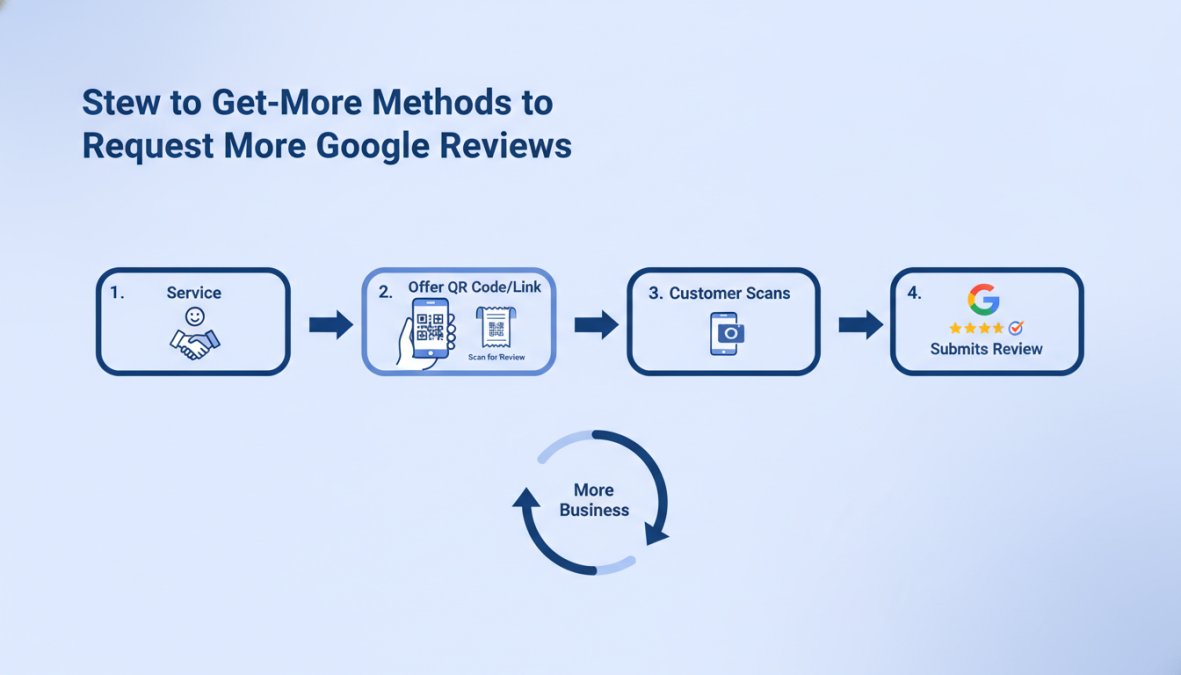
Custom Software Development Services NZ: Top 10 Agencies

Table of Contents

Last Updated: June 16, 2026

Top Custom Software Development Services in NZ: Company Comparison

Choosing the right provider for custom software development services nz is one of the most consequential technology decisions a Kiwi business will make. Businesses that partner with agencies aligned to their specific industry context and scale consistently outperform those that default to the cheapest quote. Below is how to evaluate each agency, what they actually build, and how to match your requirements to the right team.

Off-the-shelf software solves generic problems. Custom software solves your problems. According to Gartner’s analysis of enterprise software investment trends, organisations that invest in purpose-built software report significantly higher process efficiency gains than those relying on packaged solutions.

A diverse team of software developers collaborating around a large monitor displaying code and UI wireframes in a modern New Zealand office with natural light, with printed sprint boards visible on the wall behind them

Quick Comparison Table: NZ Software Development Agencies

Agency Specialisation Best For Tech Focus
Web Maniacs Full-cycle web, mobile, custom software SMEs to growth-stage businesses Web apps, mobile, SEO integration
Enlighten Designs Enterprise software, legacy modernisation Large enterprises, agritech, finance iOS, Android, AI integration
Catalyst IT Open-source, government systems Public sector, universities Cloud-native, data migration
Spiral Compute SaaS platforms, cloud-native apps Startups, modern SaaS products Node.js, React, Next.js, AWS
Orchid Mobile, web, AI automation Startups and SMEs AI workflows, UI/UX
Digital Node CRM, LMS, desktop systems Internal tools, training orgs Windows, CRM, LMS
PHP Lab Bespoke PHP web applications SMEs needing long-term support PHP, custom code ownership
HighFlyer SaaS, enterprise APIs Technical founders, direct comms SaaS architecture, APIs
Custom D AI-powered apps, AWS managed Orgs needing cloud + custom dev AWS, cross-platform, AI
Zealous System Mobile, web, IT services SMEs, entrepreneurs iOS, Android, UI/UX
Key Takeaway
No single agency dominates every use case. The strongest agencies win by specialising. Match your project type to their core competency, not their marketing copy.

What These NZ Agencies Actually Build: Custom Software Examples

What separates strong partners from weak ones is the specificity of what they’ve shipped. Here’s what the agencies above actually deliver across the main categories.

Web Application Development and SaaS Platforms

Spiral Compute focuses on modern SaaS using Node.js, React, Next.js, and Vue, prioritising architecture that supports scale from day one. HighFlyer builds SaaS platforms and custom APIs with a direct-to-engineer communication model that technical founders find refreshing. Web Maniacs delivers full-cycle web application development with an integrated approach connecting the software build to digital marketing outcomes, a genuine differentiator for growth-stage businesses where a web application nobody finds is a sunk cost. PHP Lab carves out a specific niche: affordable, bespoke PHP-based applications where the client retains full code ownership, a practical model for SMEs that want long-term maintainability without licensing dependency.

Mobile App Development and Cross-Platform Solutions

Orchid builds custom mobile and web applications with strong UI/UX and AI-powered features, well-suited to startups that need to move fast without sacrificing user experience. Zealous System offers iOS and Android development at competitive pricing for entrepreneurs and SMEs at earlier stages. Custom D takes a cross-platform approach combined with AWS managed services, suiting organisations that need both mobile front-end and cloud infrastructure under one engagement. Enlighten Designs brings over 27 years of mobile development experience across iOS and Android, particularly in agritech and finance where compliance requirements are non-trivial.

Mobile development requires separate UX consideration, platform-specific performance optimisation, and a release management process that web projects don’t need, treating it as a stripped-down web project is a common and costly mistake.

Legacy App Modernisation and API Integrations

This is where the real complexity lives and where the wrong agency choice is most costly. Enlighten Designs has a documented track record in legacy modernisation for enterprises running core systems for a decade or more. Catalyst IT specialises in complex data migration and system architecture for government and institutional clients where uptime is mission-critical. Digital Node handles system integration and business process automation for Windows desktop environments, CRM systems, and LMS platforms, a level of specialisation generalist agencies can’t match. Spiral Compute and HighFlyer both have strong API development capabilities for connecting third-party platforms to custom-built systems.

Watch Out
Agencies that promise legacy modernisation without a formal discovery session upfront are a red flag. Undocumented legacy systems require deep analysis before any estimate is reliable. Skipping discovery leads to scope blowouts that can double project costs.

Custom Software Development Cost in NZ: What to Budget

Most buyers approach custom software development cost backwards, arriving with a budget and asking what they can get for it. The more useful question is: what problem are you solving, what’s the cost of not solving it, and what does a minimum viable solution actually require?

NZ-based development generally falls into tiers based on scope. PHP Lab and Zealous System position toward the accessible end; Catalyst IT and Enlighten Designs operate on larger, longer-duration engagements. NZ-based hourly rates run higher than offshore alternatives, but the trade-offs in communication quality, time zone alignment, and accountability are significant. According to NZTech’s annual technology sector report, demand for skilled software engineers in New Zealand continues to outpace supply, directly affecting both rates and availability.

Total Cost of Ownership (TCO): Beyond the Build Invoice

The build invoice is only one component of total cost of ownership. TCO analysis accounts for the full financial picture over the software’s operational life.

The real TCO components to model before signing any contract:

  • Initial development cost: Design, engineering, testing, and deployment
  • Infrastructure and hosting: Cloud costs, database hosting, CDN, monitoring tools
  • Ongoing maintenance: Security patches, dependency updates, bug fixes
  • Feature development: New functionality as your business evolves
  • Integration costs: Connecting to new third-party platforms over time
  • Internal training: Onboarding staff to new workflows and interfaces
  • Opportunity cost of delays: Revenue or efficiency lost during development

PHP Lab’s model, where clients retain full code ownership, reduces long-term TCO by eliminating licensing lock-in. Agencies that retain code ownership create ongoing dependency that compounds over time. Treat the build as the start of a product lifecycle, not the finish line.


NZ-Specific Compliance, Data Sovereignty, and Local Platform Integrations

New Zealand’s Privacy Act 2020 imposes specific obligations on how personal data is collected, stored, and processed. Storing data on overseas cloud infrastructure under foreign jurisdiction creates legal exposure many business owners don’t discover until it becomes a problem.

According to the Office of the Privacy Commissioner NZ’s guidance on cloud computing, organisations remain accountable for personal information even when held by a third-party cloud provider. This makes data sovereignty a design requirement, not an afterthought.

Catalyst IT has the deepest expertise here, particularly for government clients where data sovereignty requirements are explicit and contractual. For commercial businesses, your development agency should advise on NZ-hosted cloud options and architecture patterns that keep data within jurisdiction. Local platform integrations matter too, software connecting with Xero, MYOB, NZ payroll systems, or government APIs requires developers who have built these integrations before. Spiral Compute and Web Maniacs both have experience here, while Enlighten Designs brings sector-specific agritech integration experience that generalist agencies lack.

Pro Tip
Before signing with any agency, ask specifically whether their cloud deployment options include NZ-hosted infrastructure. If they default to US East without discussing data sovereignty, that’s a gap in their client advisory process.

Software Development Best Practices Used by Leading NZ Agencies

The gap between an agency that ships on time and one that delivers a half-finished product six months late usually comes down to process, not technical skill.

Agile Methodology, Discovery Sessions, and Software Roadmaps

Agile methodology is the dominant delivery framework across NZ’s leading agencies. Iterative delivery, regular client checkpoints, and the ability to adjust scope based on real feedback reduces the risk of building the wrong thing. The discovery session is where good projects are separated from expensive ones, a structured analysis phase mapping business requirements, technical constraints, existing system architecture, and user needs before a single line of code is written. Its output is a software roadmap: a prioritised, phased plan connecting business goals to development milestones. Orchid and Spiral Compute use modern agile approaches with structured planning phases. Web Maniacs incorporates discovery into its personalised development process to ensure the software roadmap aligns with both technical requirements and business growth objectives.

Scalability Frameworks and Cloud-Native Architecture

Cloud-native architecture designs applications to run on cloud infrastructure from the ground up, using containerisation, microservices where appropriate, and managed services for databases, authentication, and storage. Spiral Compute and Custom D both operate with cloud-native development as a default. Custom D’s AWS managed services offering means clients get both the application and infrastructure managed under one engagement, simplifying operational overhead for teams without dedicated DevOps capacity. If your software needs to handle ten times its current load in two years, the architecture decisions made today determine whether that scaling costs a configuration change or a full rebuild.


Choosing a Software Development Agency in NZ: A Practical Framework

Most agency selection processes are too focused on price and portfolio aesthetics. The decisions that actually determine project success are less visible.

A business owner and a software consultant shaking hands across a desk with a laptop and printed project proposal between them in a professional office setting, with a large window showing a New Zealand cityscape in the background

Use this checklist before committing to any engagement:

  • Does the agency have documented experience in your industry or a closely adjacent one?
  • Do they conduct a formal discovery session before providing a fixed-scope estimate?
  • Can they demonstrate previous work with similar technical complexity?
  • Do they provide a software roadmap with phased milestones and clear deliverables?
  • Who owns the code and the IP at the end of the engagement?
  • What does their ongoing maintenance and support model look like?
  • Can they advise on NZ-specific compliance and data sovereignty requirements?
  • Do they have experience integrating with the specific third-party platforms you use?
  • What is their communication cadence and escalation process?
  • Are their developers NZ-based or offshore, and how does that affect accountability?

According to the Project Management Institute’s pulse of the profession report, poor requirements definition remains the leading cause of project failure across technology engagements globally.

Watch Out
Avoid agencies that provide fixed-price quotes without a discovery phase. Without understanding your existing systems, data model, and integration requirements, any quote is a guess. You’ll pay for the gap between the guess and reality in change orders.

Why Web Maniacs Stands Out for Custom Software Development Services NZ

The NZ software development market has no shortage of competent engineers. What it lacks is agencies that connect technical delivery to measurable business outcomes.

Web Maniacs approaches custom software development services nz from a different angle: software without visibility is a liability. A web application that doesn’t attract the right users, doesn’t convert them effectively, and doesn’t integrate with your marketing stack is technically functional but commercially underperforming. Web Maniacs delivers personalised web and app development alongside results-driven digital marketing solutions, meaning the software roadmap and growth strategy are designed together rather than treated as separate workstreams.

Key reasons to choose Web Maniacs for your custom software project:

  • Personalised development: Every engagement starts with understanding your specific business context, not a template project plan
  • Brand identity integration: Software is built to strengthen brand identity, not just function in isolation
  • Lead generation alignment: The application architecture supports customer acquisition, not just internal operations
  • User experience focus: Intuitive app design is a core deliverable, not a cosmetic layer
  • Google Local Optimisation: A capability most pure-play development agencies don’t offer

Web Maniacs’ pricing is transparent and available directly on the pricing page, with no lengthy sales process required before understanding what an engagement looks like.


Conclusion

Selecting a custom software development partner in New Zealand requires more rigour than reviewing a portfolio and comparing quotes. The agencies covered in this guide each have genuine strengths, but the right choice depends on your industry, compliance requirements, integration needs, and whether you need software that actively supports business growth or simply functions reliably.

Web Maniacs combines personalised custom software development with results-driven digital marketing, making it the strongest option for NZ businesses that need software that performs commercially, not just technically. Get started with Web Maniacs and build software that strengthens your brand, attracts the right customers, and scales with your business.

Frequently Asked Questions

How much does custom software development cost in NZ?

Custom software development cost in NZ varies widely depending on project scope, complexity, and the agency you choose. Small bespoke web applications may start from a few thousand dollars, while enterprise-grade platforms or full-cycle development projects can run into six figures. Factors like mobile app development, API integrations, and ongoing software maintenance all affect the total. Always request a detailed quote and ask agencies to break down their pricing model so you can compare true total cost of ownership.

What are the benefits of custom software over off-the-shelf solutions?

Bespoke business software is built specifically around your workflows, meaning no unnecessary features and no licensing lock-in. Unlike off-the-shelf software, custom solutions can scale with your business, integrate directly with local NZ platforms, and be updated on your terms. For industries like agritech or fintech, where compliance and workflow automation are critical, a tailored solution often delivers a stronger long-term return than adapting a generic product to fit your needs.

How do I choose a software development company in New Zealand?

When choosing a software development agency in NZ, evaluate their technical proficiency across relevant stacks, their experience with projects similar to yours, and whether they follow agile methodology with a clear software roadmap process. Ask about NZ-specific compliance knowledge, data sovereignty practices, and post-launch software maintenance. Request case studies or custom software examples from comparable industries. A structured discovery session before any contract is signed is a strong indicator of a professional, client-focused agency.

Do NZ software developers offer ongoing maintenance and support?

Yes, most established custom software development services in NZ offer ongoing maintenance, security patching, and feature enhancement as part of a retainer or support agreement. This is an important consideration during the agency selection process, as software requires continuous updates to remain secure and performant. Agencies like Digital Node and PHP Lab are specifically noted for long-term support models, while full-cycle development partners like Web Maniacs build maintenance into their end-to-end service offering.

What is the typical timeline for a custom software project in NZ?

Timelines for custom software development projects in NZ depend heavily on scope. A focused web application or MVP can take eight to sixteen weeks from discovery session to launch. More complex platforms involving cloud-native infrastructure, mobile app development, legacy app modernisation, or multiple API integrations can take six months or longer. Agencies using agile methodology typically deliver in iterative sprints, allowing you to review progress and adjust the software roadmap before the full build is complete.

This article was written using GrandRanker

Benefits of Custom Software for Startups: 2026 Guide

Table of Contents

Last Updated: June 15, 2026

The benefits of custom software for startups extend far beyond having a unique product. Most founders discover this too late, after spending months forcing their operations into off-the-shelf tools never designed for their workflows. At Web Maniacs, we work with startups at every stage of their digital journey, and the pattern is consistent: the businesses that scale fastest treat software as a strategic asset, not an afterthought. Below, we’ll show you how to evaluate whether custom software is right for your stage, what it actually costs, and how to avoid the traps that derail most early-stage builds.

Why the Benefits of Custom Software for Startups Go Beyond the Basics

Custom software development is the process of designing, building, and maintaining applications built specifically for a single organization’s requirements, rather than adapting a general-purpose product to fit a business need.

The real case for custom software is about control: control over your tech stack, your data, your user experience, and your ability to change direction without asking a vendor’s permission. Off-the-shelf tools are built for the median user. If your competitive edge depends on doing something the median user doesn’t do, you’re already at a disadvantage. Workflow automation that maps to your exact process, API integrations that connect your specific data sources, and a UX designed around your customers’ actual behavior are the operational foundation that lets you move faster than competitors wrestling with software constraints.

There’s also an intellectual property dimension that rarely gets discussed. Every feature you build in a custom application is an asset you own. Every workflow you automate in a SaaS platform is a process that lives in someone else’s system, on someone else’s terms.

Key Takeaway
Custom software is not primarily a technology decision. It’s a decision about whether your business processes will be shaped by your tools, or whether your tools will be shaped by your business.

The benefits of custom software for startups compound over time. Early on, the advantage is fit. Later, it’s the absence of vendor lock-in and the freedom to scale on your own terms.

Off-the-Shelf vs Custom Software for Startups: How to Choose

The off-the-shelf vs custom software for startups question has a simple answer: it depends on whether your differentiation lives in your software. If it doesn’t, buy. If it does, build.

Most startups have a mix of commodity processes (accounting, HR, basic CRM) and differentiated processes (proprietary workflows, unique customer interactions, specialized data handling). The right approach is usually a hybrid: off-the-shelf tools for commodity functions, custom development for the parts that create competitive advantage.

Where Off-the-Shelf Software Falls Short

Off-the-shelf software creates three specific problems for growing startups.

First, feature bloat. Enterprise SaaS products are built for the largest possible customer base, meaning you pay for features you’ll never use. Second, integration friction. As your tech stack grows, getting disconnected SaaS tools to share data cleanly becomes a full-time job, often resulting in error-prone Zapier automations and manual exports. Third, and most critically: pricing that scales against you. Many SaaS platforms charge per seat, per record, or per API call. A tool that costs $200 per month at 10 employees can easily cost $3,000 per month at 100 for the same functionality.

According to Gartner’s analysis of enterprise software spending, organizations frequently underestimate the total cost of SaaS ownership when factoring in integration, training, and scaling costs over a three-to-five-year horizon.

The Hidden Costs of Custom Development You Should Know

Custom development has its own cost traps. The four worth knowing before you start:

  • Ongoing maintenance: Budget 15-20% of the initial build cost annually for security patches, dependency upgrades, and third-party API compatibility.
  • Documentation debt: Undocumented code becomes a liability the moment the original developer leaves.
  • Testing infrastructure: Automated testing environments, staging servers, and QA processes add cost that first-time buyers often exclude from initial quotes.
  • Change requests: Every change request on a fixed-price contract costs more than the same change would have cost during the original build.
Watch Out
Accepting a fixed-price quote without a clearly scoped specification document almost always results in scope creep disputes. Insist on a detailed specification before signing any development contract.

When to Build Custom Software: A Practical Decision Framework

If three or more off-the-shelf tools exist that solve your problem within 80% of your requirements, buy and adapt. If no single tool gets you past 60% fit, or if the missing 40% is your core competitive differentiator, build.

The Build vs. Buy Decision Checklist

Use this checklist before committing to custom development. Answer honestly.

  • Does this process directly affect the customer experience your business is built around?
  • Have you evaluated at least three off-the-shelf alternatives and found them inadequate?
  • Do you have ongoing budget for maintenance, not just the initial build?
  • Is your requirements specification detailed enough to get an accurate quote?
  • Do you have a technical person (internal or external) who can evaluate the quality of what’s delivered?
  • Is the process stable enough that you won’t need to redesign it within six months?
  • Have you accounted for the opportunity cost of developer time vs. other growth investments?

If you answered "no" to three or more of these, reconsider the timing. Custom software built on unstable requirements or without ongoing maintenance budget creates technical debt faster than it creates value.

Core Benefits of Custom Software for Startups That Drive Growth

The strongest argument for custom software is that it compounds. The advantages below are not independent features; they reinforce each other over time.

A small startup team of four people collaborating around a laptop and whiteboard in a bright modern open-plan office, reviewing an application interface on screen with printed wireframes spread across the table

Scalability and Flexibility as You Grow

Custom software scales with your business architecture, not against it. With custom development, scalability is a design decision made upfront, cloud infrastructure, database architecture, and API design can all be optimized for your anticipated growth trajectory. Many startups build on modular architectures that let them add features incrementally without rebuilding the core system.

Flexibility matters equally. A startup that pivots its business model needs software that can change with it. Custom applications built on clean, documented code can be modified in days. Reconfiguring an off-the-shelf platform to support a business model it wasn’t designed for often takes months and frequently fails.

Security, Data Protection, and Intellectual Property Ownership

Custom software lets you design security controls appropriate to your specific risk profile, regulatory environment, and customers’ expectations. Off-the-shelf platforms handle security at a platform level, meaning you share infrastructure with thousands of other businesses and accept whatever security posture the vendor has chosen, a meaningful risk for startups handling sensitive data or regulated information.

Intellectual property ownership is the other dimension. Code you commission and pay for is yours. As noted in guidance from the US Copyright Office on software ownership, software created under a work-for-hire agreement belongs to the commissioning party, not the developer, making contract structure critical.

Competitive Advantage Through Tailored Solutions

When your competitors all use the same off-the-shelf CRM, project management tool, and customer support platform, they’re operating with roughly the same capabilities. A startup that builds tailor-made applications for its core processes creates an operational gap that’s hard to close quickly.

Most guides frame custom software as a cost center. The more accurate frame is that it’s a moat. It takes time and money to build, but it’s also time and money competitors would have to spend to catch up.

Improved Efficiency Through Workflow Automation and Integration

Workflow automation built into custom software eliminates manual handoffs that slow down growing teams. A custom application can connect your sales data, inventory system, customer support history, and financial reporting in a single interface, with logic that reflects how your business actually works. According to McKinsey’s research on digital transformation and operational efficiency, businesses that integrate their core systems and automate manual workflows consistently report measurable improvements in throughput and error reduction. When software is built around your team’s actual workflow, adoption rates are higher, training time is shorter, and data quality improves because the interface makes correct entry the path of least resistance.

Custom Software Development Cost for Startups: What to Budget

Custom software development cost for startups varies significantly based on scope, complexity, and engagement model. A useful mental model: think in three phases. Discovery and specification (typically 10-15% of total project cost), development and testing (60-70%), and ongoing maintenance and iteration (15-20% annually). Skipping the discovery phase is the single most reliable predictor of cost overruns.

MVP Development Lifecycle and Cost Stages

The MVP (Minimum Viable Product) approach is the right starting point for most startups, a version of your product with enough features to validate your core hypothesis with real users, without building everything you eventually want.

The MVP development lifecycle typically moves through four stages:

  1. Discovery: Define the problem, map user flows, prioritize features. Output: a specification document and clickable prototype.
  2. Development sprint: Build the core features only. Resist scope expansion.
  3. Testing and feedback: Deploy to a limited user group, collect structured feedback.
  4. Iteration: Prioritize changes based on evidence, not assumption.

The discipline of the MVP process is in what you don’t build. Every feature added increases cost, extends timeline, and delays the feedback that tells you whether your core assumption is correct.

No-code and low-code platforms like Bubble, Webflow, and Retool are worth evaluating for MVP stages. Bubble handles complex data-driven web applications starting at $59 per month; Retool is purpose-built for internal tools with native SQL and REST API support. These tools can validate a concept quickly before committing to a full custom build.

Managing Technical Debt Over the Software Lifecycle

Technical debt is the accumulated cost of shortcuts taken during development. Every startup accumulates some; the question is whether you manage it intentionally or let it compound into a crisis.

Allocate a fixed percentage of each development sprint to debt reduction, a common guideline is 20% of development time. As referenced in IEEE Software Engineering guidelines on technical debt management, organizations that treat technical debt as a first-class concern maintain significantly higher development velocity over multi-year software lifecycles. Teams that ignore it typically find that after 18-24 months, the cost of adding new features increases dramatically because every change requires working around earlier shortcuts.

Pro Tip
Request a code quality audit before signing a long-term maintenance contract with any development agency. A well-structured codebase with documented architecture is worth paying more for upfront. Inheriting undocumented spaghetti code is expensive to fix and expensive to maintain.

How to Choose a Custom Software Development Partner

Choosing the right custom software development partner is as consequential as the software itself. A technically skilled team that doesn’t understand startup constraints will build something that works but doesn’t fit your stage or budget.

A business professional in a navy blazer shaking hands with a developer across a desk, with open laptops and printed project specification documents visible under warm office lighting

The Web Maniacs team has worked with startups across multiple growth stages, and the evaluation criteria that matter most are rarely the ones that appear in agency pitch decks.

Four questions that reveal more than a portfolio review:

  1. How do you handle changing requirements mid-project? The answer tells you whether they have a real process or whether they’ll charge you for every conversation.
  2. Can you show me a project where the client’s initial brief was wrong? Good partners push back on bad requirements. Yes-men build what you ask for and let you discover the problem at launch.
  3. What does your handover process look like? Ask specifically about documentation and knowledge transfer, code you can’t maintain without the original agency is a liability.
  4. What’s your approach to post-launch support? Bugs appear after launch. The question is whether your partner treats post-launch issues as part of the engagement or a new billing opportunity.

Agencies that work in iterative sprints with regular demos give you visibility into progress and the ability to course-correct before problems become expensive. Waterfall projects that deliver everything at the end give you no such opportunity. When evaluating cost, remember that the cheapest quote is rarely the cheapest outcome, a partner with deep startup experience who delivers clean, documented, maintainable code will cost less over a three-year software lifecycle than a cheaper team that delivers technical debt.


Most startups reach a point where their off-the-shelf tools are holding them back faster than they’re helping them grow. If your team is spending significant time working around software limitations rather than building your business, that’s the signal. Web Maniacs provides custom software development, web application builds, and mobile app creation designed specifically for businesses that need software that fits their operations, not the other way around. With personalised development, results-driven digital marketing, and comprehensive support from initial specification through to launch, the team is built to take you from concept to scalable product. Get started with Web Maniacs and build software that grows with your business.

Frequently Asked Questions

Is custom software worth the investment for a startup?

For many startups, the benefits of custom software outweigh the upfront costs when the business has unique workflows that off-the-shelf tools cannot support. Custom software eliminates vendor lock-in, scales with your growth, and becomes a proprietary asset that can strengthen your startup's valuation. The key is timing, investing too early without validated product-market fit can drain resources, so most startups benefit from starting with an MVP before committing to full custom development.

When should a startup consider custom software development?

A startup should consider custom software development when existing SaaS tools create significant workflow gaps, require expensive workarounds, or when your core business process is itself the product. Other strong signals include needing deep API integration with legacy systems, strict data security requirements, or a need for a competitive edge through a unique user experience. If your operations are genuinely differentiated, tailor-made applications will serve you far better than adapting to generic software.

What are the risks of using off-the-shelf software for startups?

The main risks of off-the-shelf software for startups include vendor lock-in, limited customization that forces you to change your business processes to fit the tool, and subscription costs that scale unpredictably. As your startup grows, you may also encounter integration challenges when connecting multiple SaaS platforms, data portability issues, and a lack of control over the software roadmap. These constraints can slow digital transformation and limit your ability to build a truly differentiated product.

What is the difference between custom software and SaaS for startups?

SaaS (off-the-shelf software) is a ready-made product built for a broad market, you subscribe and adapt your processes to fit it. Custom software development means building tailor-made applications specifically for your business operations, which you own outright as intellectual property. SaaS is faster and cheaper to start with, while custom software offers greater flexibility, scalability, and long-term ROI. Many startups use SaaS tools early on, then invest in custom solutions once their core processes are validated and stable.

How do I estimate custom software development costs for my startup?

Custom software development cost for startups varies widely based on scope, tech stack, and whether you use a development agency or in-house team. A basic MVP typically starts from a few thousand dollars with no-code tools, while a fully custom-coded web or mobile application built by an agency can range from $5,000 to well over $50,000. Key cost drivers include feature complexity, API integration requirements, UX design, cloud infrastructure, and ongoing long-term maintenance. Starting with a scoped MVP is the most cost-effective approach.

This article was written using GrandRanker

Custom Software Development for Small Businesses: 2026 Guide

Table of Contents

Last Updated: June 14, 2026

Custom software development for small businesses sits at the intersection of ambition and practical risk. Most small business owners assume it’s out of reach financially or technically, and that assumption costs them years of wrestling with off-the-shelf tools that almost fit their workflows. At Web Maniacs, we’ve worked with SMEs across industries who made the switch to bespoke solutions and found the results went well beyond convenience. Below, we’ll show you how to evaluate whether custom software makes sense for your business, what the development process looks like, and how to avoid the mistakes that drain budgets without delivering results.

Here’s what most guides get wrong: they treat custom software as an enterprise luxury. A well-scoped custom-built application can deliver a stronger ROI for a small business than a large one, precisely because small teams feel the friction of a poor software fit every single day.

Why Custom Software Development for Small Businesses Is Worth Considering

Small businesses lose significant operational capacity to software workarounds, manually copying data between systems, paying for five subscriptions that don’t talk to each other, and building spreadsheet logic to compensate for missing features. This is the real cost that never appears on a licensing invoice.

Custom software development for small businesses solves a specific problem: your business has a proprietary workflow that no generic product was designed to support. Bespoke software is built around your actual processes, not a hypothetical average user.

A small business owner reviewing a custom analytics dashboard on a laptop at a tidy wooden desk, looking focused and engaged in a well-lit modern office with plants and minimalist decor

Benefits of Bespoke Software Over Off-the-Shelf Solutions

The core advantage of bespoke software isn’t features, it’s fit. Off-the-shelf platforms carry features you’ll never use and lack the ones specific to your operations. Custom-built applications eliminate that gap entirely.

Practical benefits include:

  • Full ownership of your IP: You own the codebase, database design, and logic. No vendor can discontinue your product or change pricing.
  • Scalability on your terms: Architecture is designed for your growth trajectory, not a vendor’s roadmap.
  • Workflow automation that mirrors reality: Triggers and business logic are built around your actual approval chains and reporting needs.
  • Competitive differentiation: A proprietary workflow encoded in software is genuinely hard for competitors to replicate.
  • No per-seat licensing: Once built, costs don’t scale with headcount the way SaaS subscriptions do.

Custom solutions also reduce technical debt. With off-the-shelf tools, you accumulate integration workarounds and data silos. A well-architected custom solution consolidates that complexity into a single, maintainable system.

Signs Your SME Is Ready for a Custom-Built Application

Not every small business needs custom software. Watch for these signals:

  • Your team spends hours per week on manual data entry between systems
  • You’ve built significant logic inside spreadsheets that breaks when someone is away
  • You’ve outgrown your current platform but the next tier is priced for enterprise
  • Your business process doesn’t fit any off-the-shelf solution after testing several
  • You’re paying for multiple subscriptions that only partially overlap in function
  • API integration between existing tools is unstable or requires constant maintenance
Watch Out
If your primary motivation is “we want something that looks nicer,” custom development is the wrong investment. The ROI case for bespoke software rests on operational efficiency and competitive advantage, not aesthetics. Confusing UX preferences with workflow requirements is one of the most common mistakes SMEs make before commissioning a build.

Off-the-Shelf vs Custom Software: How to Make the Right Call

The build vs. buy decision is rarely clear-cut. Off-the-shelf software wins on speed to deployment and lower upfront cost. Custom development wins on fit, ownership, and long-term scalability. A practical framework: if you can solve 90% of your requirements with an off-the-shelf product, buy it. If you’re solving less than 70%, the ongoing cost of workarounds and integration maintenance will likely exceed the cost of building something tailored.

Comparison Table: Off-the-Shelf vs Custom Software

Criteria Off-the-Shelf Custom Software
Upfront cost Low to moderate Higher initial investment
Time to deploy Days to weeks Weeks to months
Workflow fit Partial, generic Exact match to your process
Scalability Vendor-dependent Built to your growth plan
IP ownership Vendor owns software You own the codebase
Ongoing cost Recurring licensing fees Maintenance and support costs
Integration flexibility Limited by vendor APIs Full control via custom APIs
Competitive advantage None (competitors use same tool) High (proprietary workflow)

Low-Code and No-Code Platforms: A Middle Ground Worth Knowing

Before committing to full custom development, many SMEs benefit from exploring low-code and no-code platforms, more flexible than standard SaaS, without the full cost of a bespoke build.

Bubble is the strongest option for complex web applications, handling sophisticated workflow logic, database design, and API connectivity without requiring a full-stack developer.

Google AppSheet works well for businesses whose data already lives in spreadsheets, turning Sheets or SQL data into functional mobile and web applications with offline syncing and automated workflow triggers.

Zoho Creator suits businesses already inside the Zoho ecosystem, with solid BI tools and cross-platform compatibility, though advanced features are locked behind higher pricing tiers.

Glide is the fastest path to a working internal tool or client portal, built for non-technical users, with pricing complexity around user and update limits as the main friction point at scale.

Microsoft Power Apps makes sense if your business runs on Microsoft 365 or Azure, with strong integration across SharePoint, Dynamics 365, and SQL Server, though licensing costs can become confusing for small teams.

Pro Tip
For SMEs with a technical team member, Appsmith is worth evaluating. It’s an open-source low-code platform that connects to any database, supports custom JavaScript logic, and can be self-hosted for data privacy. The extensibility is exceptional for internal dashboards and reporting tools.

The honest limitation of low-code platforms: they introduce vendor dependency. If the platform changes pricing or gets acquired, your operations are affected. Full custom development eliminates that risk.

Understanding Custom Software Development Cost and ROI

The biggest misconception about custom software development cost is that it’s a single number. It’s a lifecycle calculation covering discovery, design, development, testing, deployment, and ongoing maintenance. Treating the build cost as the total cost is where most small business budgets go wrong.

A realistic cost-benefit analysis should account for:

  • Discovery and scoping: Requirements definition, architecture planning, and technical specification
  • Design and UX: User experience design and interface prototyping
  • Development: Full-stack development, database design, API integration
  • Testing and QA: Performance optimisation, security testing, user acceptance testing
  • Deployment: Cloud-based infrastructure setup and launch
  • Maintenance: Ongoing support, bug fixes, and feature updates

The ROI calculation shifts significantly when you account for hidden costs in your current setup: licensing fees across multiple tools, hours spent on manual processes, and the opportunity cost of workflows that don’t scale.

According to Gartner’s analysis of software investment trends, organisations that align software investment with specific operational outcomes consistently achieve stronger returns than those that purchase based on feature lists alone.

Post-Launch Maintenance and Support: The Hidden Budget Line

Post-launch maintenance is not optional, it’s a recurring cost that should be budgeted from day one, typically running at a percentage of the initial build cost annually. What maintenance covers: security patches, compatibility updates as third-party APIs evolve, performance optimisation as data volume grows, feature additions, and bug fixes. An unmaintained codebase becomes a liability that eventually costs more to fix than it would have to maintain consistently. Before signing any development contract, clarify the maintenance model: Is support included? At what rate? Is there a retainer option?

MVP Strategy: How Small Businesses Can Reduce Upfront Risk

An MVP (Minimum Viable Product) approach is the most practical way for small businesses to enter custom software development without overcommitting budget upfront. Build the smallest version of your application that delivers real value, then iterate based on actual usage.

A practical MVP framework for SMEs:

  1. Define the core problem your software must solve (one specific workflow, not everything)
  2. Identify the minimum feature set that makes that workflow functional
  3. Set a fixed scope and timeline for the first build
  4. Deploy to a small internal user group and collect structured feedback
  5. Prioritise the next iteration based on what users actually need, not what you assumed
Key Takeaway
An MVP is not a cheap, low-quality version of your vision. It’s a disciplined way to validate your vision before scaling it. Small businesses that skip the MVP phase and try to build everything at once typically end up with software that’s over-engineered for current needs and under-tested for actual workflows.

The Custom Software Development Process for Small Businesses

Understanding the development process helps you manage expectations, communicate with your development partner, and protect your investment. Agile methodology is the standard approach for most custom development projects.

From Discovery to Deployment: Key Phases Explained

Phase 1: Discovery and Requirements (1-3 weeks)
Defines what you’re building and why. A good partner will interview stakeholders, map existing workflows, identify integration requirements, and produce a technical specification. Don’t skip this phase to save money, poorly defined requirements are the primary cause of budget overruns.

Phase 2: Architecture and Design (1-2 weeks)
Database design, system architecture, and UX prototyping. The output is a design prototype and technical architecture document you can review before a line of code is written.

Phase 3: Development (varies by scope)
Full-stack development proceeds in agile sprints. You should receive working software at the end of each sprint, not just progress reports, this is a non-negotiable quality signal.

Phase 4: Testing and QA (1-2 weeks)
Performance optimisation, security testing, and user acceptance testing. For applications handling customer data, security testing is not optional.

Phase 5: Deployment and Handover
Launch to production environment, staff training, and documentation handover. A reputable partner provides documentation that allows another developer to maintain the codebase if needed.

Common Types of Custom Applications That Drive Operational Efficiency

Small businesses commission custom software across a wide range of use cases. The common thread is always the same: a workflow that generic tools couldn’t support efficiently.

The most frequently built types include:

  • Custom CRM systems: Built around your specific sales process and reporting requirements rather than a generic pipeline model
  • Inventory management systems: Valuable for businesses with complex stock rules, multi-location tracking, or custom supplier integrations
  • Customer and vendor portals: Self-service interfaces that reduce manual communication overhead significantly
  • ERP integrations: Connecting accounting, HR, and operations tools into a unified dashboard and reporting layer
  • Business intelligence dashboards: Custom reporting surfacing the specific metrics your business runs on
  • Workflow automation tools: Automating approval chains, notifications, and data routing between internal systems
  • Booking and scheduling systems: Built for your specific service model rather than a generic appointment platform

According to McKinsey’s research on digital transformation in SMEs, businesses that invest in digital tools tailored to their specific operations outperform peers in operational efficiency over a three-to-five year horizon.

Most small business owners don’t ask the right questions before signing a development contract, and the consequences can be significant.

IP ownership is not automatic. In many jurisdictions, the default legal position is that the developer owns the intellectual property they create unless the contract explicitly states otherwise. You must have a clause that assigns full IP ownership to your business upon payment.

Key legal points to clarify before any project begins:

  • Source code ownership: Does the contract explicitly state you receive full source code and own it outright?
  • Third-party components: Does the application use open-source libraries or third-party APIs? What are the licensing implications?
  • Data ownership: Who owns the data stored in the application? This should always be you.
  • Confidentiality: Does the contract include an NDA covering your business processes and proprietary workflows?
  • Escrow arrangements: For large projects, consider source code escrow to protect against a development partner going out of business.

Have a lawyer review the development agreement before signing, specifically looking for IP assignment, liability clauses, and termination terms.

As noted in guidance from the New Zealand Intellectual Property Office on software ownership, software IP ownership disputes are most common when contracts are ambiguous or silent on the question of assignment.

How to Choose a Software Development Partner That Fits Your Business

Choosing the right development partner is the decision that determines whether your project succeeds or fails.

Two professionals in a bright meeting room shaking hands across a table with open laptops, printed documents, and coffee cups visible, representing a small business owner and software developer finalising a partnership

A development partner worth working with will demonstrate domain knowledge in your industry, a clear discovery process, and a track record of delivering working software at your scale. Web Maniacs specialises in personalised web and app development for SMEs, combining custom software development with results-driven digital marketing to ensure your application supports both operational needs and business growth objectives. You can review service options and pricing directly on the Web Maniacs pricing page.

When evaluating any partner, prioritise these factors:

  • Portfolio relevance: Have they built applications for businesses with similar complexity and scale?
  • Development methodology: Do they work in agile sprints with regular deliverables, or disappear for months?
  • Communication cadence: How often will you receive updates? Who is your point of contact?
  • Post-launch support: What does their maintenance model look like?
  • Contract clarity: Do they provide a clear IP assignment clause without being asked?

According to Clutch’s annual software development partner survey, communication quality and project management transparency are the top factors small businesses cite when rating development partners, ranking above technical skill in overall satisfaction scores.

Red Flags to Watch for During the Vetting Process

The vetting process reveals more than a sales conversation ever will. Watch for these warning signs:

  • Vague scoping: A fixed price quote without a discovery phase means they haven’t understood your requirements, you’ll pay for that gap later.
  • No references from similar projects: Generic testimonials are not the same as verifiable references from comparable clients.
  • Reluctance to discuss IP ownership: Any hesitation on this point is a serious signal.
  • No documentation process: If they don’t mention technical documentation, your codebase will be unmaintainable by anyone else.
  • Overpromising on timelines: A partner who tells you what you want to hear about delivery dates is managing your expectations in the wrong direction.
  • No testing phase in the proposal: Software delivered without structured QA will fail in production.

The real difference between a good development partner and a problematic one often shows up in the discovery phase. A partner who asks hard questions, challenges your assumptions, and pushes back on scope creep is protecting your investment.

Frequently Asked Questions

How much does custom software development cost for small businesses?

Custom software development costs vary widely depending on complexity, features, and the development partner you choose. A simple internal tool or MVP can start at a few thousand dollars, while a full-scale custom platform may run significantly higher. Beyond the build cost, factor in ongoing post-launch maintenance, hosting, and support. Reviewing a provider's pricing page upfront and scoping an MVP first are practical ways to manage budget risk for small businesses.

What is the difference between off-the-shelf and custom software?

Off-the-shelf software is a ready-made product built for a broad audience, such as a generic CRM or ERP. Custom software is built specifically for your business's proprietary workflow, data structure, and operational needs. Off-the-shelf solutions are faster to deploy and cheaper upfront but often require workarounds, carry recurring software licensing fees, and may accumulate technical debt. Custom-built applications offer scalability and a precise fit but require greater initial investment and a clear development process.

Is custom software development worth the investment for a small business?

For many SMEs, custom software development delivers strong ROI by eliminating manual processes, replacing multiple off-the-shelf subscriptions, and enabling workflow automation unique to the business. The key is conducting a proper cost-benefit analysis before committing. Starting with an MVP reduces risk significantly. If your business has a proprietary workflow that generic tools cannot support efficiently, custom development is often worth pursuing with the right software development partner.

How long does it take to develop custom software?

Development timelines depend on scope and complexity. A minimum viable product built using an agile methodology can be ready in six to twelve weeks. A more comprehensive custom application with API integration, database design, and dashboard and reporting features typically takes three to nine months. Working with an experienced development partner who follows a structured software lifecycle, from discovery through deployment, helps keep timelines realistic and avoids costly scope creep.

Who owns the code when a small business commissions custom software?

IP and code ownership must be explicitly defined in your contract before development begins. Many small businesses assume they own everything built for them, but some development agencies retain licensing rights to reusable components or frameworks. Always request a clause confirming full source code ownership and transfer upon project completion. Clarifying this upfront protects your business, prevents vendor lock-in, and ensures you can maintain or migrate the software independently in the future.


Building the right software for your business is one of the highest-leverage decisions a small business owner can make, and also one of the easiest to get wrong without the right guidance. Web Maniacs brings together custom software development, intuitive app design, and results-driven digital marketing to deliver solutions that strengthen your brand identity and increase online visibility from day one. Get started with Web Maniacs and build software that actually fits how your business works.

This article was written using GrandRanker

Why Custom Software Beats Spreadsheet Tracking in 2026

Table of Contents

Last Updated: June 13, 2026

Understanding why custom software beats spreadsheet tracking is one of the most consequential decisions a growing business can make. Spreadsheets were never designed to run a business, they were designed to calculate. Below, we’ll show you how to identify the breaking point, calculate the real cost of staying in "Excel hell," and map a practical transition that reduces risk while accelerating growth.

Why Custom Software Beats Spreadsheet Tracking: The Core Case

Custom software beats spreadsheet tracking because it eliminates structural weaknesses spreadsheets cannot overcome: version control failures, data integrity gaps, manual reporting bottlenecks, and the absence of access control at scale.

Spreadsheets are a starting point, not a destination. For a small team managing a handful of clients, a well-structured Excel file works fine. But the moment a business adds headcount, expands data volume, or needs simultaneous editing, the spreadsheet model collapses. Most guides frame this as a technology preference. It is not. It is a structural risk problem. A business running on shared spreadsheets runs on a single point of failure, one corrupted file, one accidental overwrite, one departing employee with the "master version," and critical data is gone.

Custom enterprise software solves this at the architectural level. Centralized data, role-based access control, automated workflows, and real-time analytics are not premium features, they are the baseline of any system built to support a functioning business.

Signs Your Business Has Outgrown Excel

Most businesses miss the moment they outgrow spreadsheets because the failure is gradual. Warning signs accumulate quietly: reports take longer to compile, team members maintain their own "local" file versions, and the person who built the original spreadsheet becomes the only one who understands it. A business process only one person can maintain is not a process, it is a liability.

A frustrated business professional surrounded by multiple open laptop screens showing complex spreadsheets in a cluttered, dimly lit office, with printed spreadsheet reports scattered across the desk

Workflow Bottlenecks and Data Silos Are Slowing You Down

Workflow bottlenecks in spreadsheet-dependent businesses follow a predictable pattern. Data lives in separate files owned by separate teams, sales has one version of customer data, finance has another, operations a third. None talk to each other automatically. Every cross-departmental report requires manual consolidation, introducing both delay and error. Business intelligence becomes a lagging indicator: by the time a manager has a consolidated view of last week, the decisions that needed to be made last week are already done on incomplete information.

Custom internal tools solve this by design. Data entered in one place is immediately available everywhere it is needed.

Version Control Chaos and the Single Point of Failure Problem

Version control is where spreadsheet tracking fails most visibly. When multiple team members work across different copies of the same file, "which version is current?" becomes genuinely unanswerable. According to research cited by Harvard Business Review’s analysis of data quality in organizations, poor data quality is one of the most significant hidden costs in modern business operations.

A spreadsheet stored on one person’s machine, or even in a shared cloud folder without proper database management, can be corrupted, deleted, or become inaccessible with no audit trail and no recovery path. Custom software maintains a complete, timestamped record of every data change. For any business under compliance requirements, that is a legal necessity.

Watch Out
Never underestimate the risk of a “master spreadsheet” maintained by one person. When that person leaves, the institutional knowledge embedded in that file’s structure often leaves with them, and rebuilding it can take months.

The Risks of Spreadsheet Errors in Business You Cannot Afford to Ignore

The risks of spreadsheet errors extend well beyond inconvenience. Operational errors from manual data entry have caused regulatory penalties, financial restatements, and lost contracts at organizations of every size. The problem is not carelessness, it is that spreadsheets provide no structural protection against human error. No validation layer, no duplicate detection, no referential integrity. Every formula is one accidental keystroke away from returning a wrong answer silently.

The Hidden Costs of Manual Reporting and Error-Prone Data Entry

Teams relying on spreadsheet-based reporting often spend several hours each week pulling data from multiple sources, cleaning it, formatting it, and distributing it. Multiplied across five or ten people, the cumulative time cost becomes significant, but the deeper cost is opportunity cost. Analysts reformatting pivot tables are not doing analysis. Managers consolidating department reports on Friday afternoons are not managing.

Business process automation addresses this directly. When data flows automatically from input to report, the manual layer disappears, reports become available in real time, and the people who produced them are freed for higher-value work.

Compliance, Access Control, and Data Security Gaps

Compliance requirements make spreadsheet tracking genuinely untenable for many industries. Healthcare, finance, legal, and any business handling personal data under privacy regulations needs a documented, auditable data trail that spreadsheets cannot reliably provide. Access control is equally problematic: a shared spreadsheet is typically all-or-nothing. Custom software implements granular, role-based access control so a sales representative can see their own customer records without accessing payroll or pricing data.

As documented in Gartner’s research on data security and governance, organizations that fail to implement proper access governance face disproportionate risk exposure as data volumes grow.

Key Takeaway
Spreadsheet-based systems have no native audit trail. For any business subject to compliance requirements, this is not a minor gap. It is a structural disqualification.

Custom Software vs Off-the-Shelf Software: Which Is Right for You?

The choice between bespoke software and off-the-shelf SaaS is more nuanced than most comparisons acknowledge. The right answer depends on the specificity of your workflows, your integration requirements, and your growth trajectory.

Pros and Cons at a Glance

Factor Custom Software Off-the-Shelf SaaS Spreadsheets
Fit to your process Exact Partial Manual workarounds
Upfront cost Higher Lower Near zero
Ongoing cost Lower long-term Recurring per seat Staff time
Scalability Built to spec Vendor-dependent Poor
Access control Granular Moderate Minimal
Integration Full control API-limited Manual
Compliance support Designed in Varies Inadequate

When Bespoke Software Wins Over SaaS

Bespoke software wins when your process does not fit any existing product category, when integration requirements are complex, or when per-seat SaaS pricing becomes prohibitive at scale. Tools like Airtable (starting at $20 per seat per month) and Google AppSheet (from $5 per user per month) occupy a useful middle ground for teams transitioning away from spreadsheets. Quickbase targets mid-to-large enterprises replacing mission-critical spreadsheet processes with governed, scalable applications.

The limitation of all SaaS platforms is that you are building your business process around someone else’s product roadmap. When the vendor changes pricing, deprecates a feature, or gets acquired, your operations are affected. A common mistake is choosing SaaS for its lower starting cost without accounting for the workarounds you will build as platform limitations emerge, workarounds that are technical debt, compounding over time.

Calculating the Real ROI of Custom Software Development

ROI calculations for custom software are frequently underestimated because businesses count only the development cost, not the cost of the problem they are solving. A practical framework:

  1. Calculate current manual reporting cost: Hours per week on manual data tasks multiplied by average hourly staff cost.
  2. Calculate error cost: Estimate frequency and average cost of data errors (rework, customer impact, compliance risk).
  3. Calculate opportunity cost: What higher-value work is deferred because staff are managing spreadsheets?
  4. Sum the annual cost of the current state: This is your baseline.
  5. Estimate custom software development cost: Include build, testing, and deployment.
  6. Calculate payback period: Divide development cost by annual current-state cost.

Many businesses find their payback period is under 18 months. According to McKinsey’s analysis of digital transformation ROI, organizations that invest in purpose-built operational tools consistently outperform those relying on generic solutions adapted to fit their needs.

Pro Tip
Run the ROI calculation before starting any vendor conversation. Knowing your baseline cost gives you a clear budget ceiling and makes the business case to internal stakeholders far easier to defend.

Hybrid Approaches and Migration Roadmap: How to Make the Transition

The biggest reason businesses stay stuck in spreadsheet dependence is not cost or complexity, it is fear of disruption. A full system replacement feels risky when the current system, however imperfect, is keeping the business running. The hybrid approach resolves this by treating migration as a phased process rather than a cutover event.

A small team of three professionals collaborating around a whiteboard covered in sticky notes and a handwritten transition plan, with laptops open on a modern conference table under warm overhead lighting

Start Hybrid: Reduce Risk Without a Full Rebuild

A hybrid approach means running your new system in parallel with existing spreadsheets during an overlap period. The new software handles new data entry and processing; spreadsheets remain as read-only reference for historical data until the new system is validated. Staff build familiarity without the pressure of a hard cutover, and errors can be caught by cross-referencing the old system.

The practical limit is time. Running two systems creates its own overhead, and a prolonged overlap undermines the efficiency gains you built the new system to deliver. Set a defined end date for the hybrid phase before you begin.

A Practical Migration Roadmap From Spreadsheets to Custom Software

Use this checklist to structure your migration:

  • Audit all active spreadsheets: identify owners, data types, and update frequency
  • Map dependencies: which spreadsheets feed into other spreadsheets or reports?
  • Prioritize by risk: which processes carry the highest cost if they fail?
  • Define data schema: translate spreadsheet columns into a proper database structure
  • Build and test the core system with a subset of real data
  • Run parallel operations for a defined period (four to eight weeks is typical)
  • Train all users before the cutover date
  • Archive spreadsheets as read-only historical records
  • Decommission spreadsheet-based workflows on the agreed cutover date
  • Conduct a 30-day post-migration review to catch gaps

The key variable is not the technology, it is the people who need to trust the new system before they will use it. Businesses with deeply embedded legacy processes may need a longer parallel phase; simpler operations may cut over faster.

Why Custom Software Beats Spreadsheet Tracking for Long-Term Scalability

Scalability is where the spreadsheet model breaks down completely and irreversibly. A spreadsheet does not scale, it grows until it becomes unmanageable, then either gets replaced or becomes the source of chronic operational problems nobody has time to fix.

Custom software is designed from the start to handle growth. The database architecture that works for 500 records works for 5 million. The access control model that works for 10 users works for 500. Automated workflows do not require additional staff time as transaction volume increases. The operational efficiency advantage compounds: every month, the business running on custom software spends less time on manual data management than the month before. The business still on spreadsheets spends more.

As noted by Forrester’s research on the total economic impact of custom software, the long-term value of purpose-built internal tools consistently exceeds initial projections because efficiency gains extend into workflows outside the original scope. Every formula added to patch a process gap, every new tab created for a new data type, every manual reporting step is technical debt that accumulates silently, and that custom software stops accruing from the moment it goes live.


Businesses still running critical operations on spreadsheets are not just inefficient, they are carrying structural risk that grows with every new user, every new data point, and every new compliance requirement. Web Maniacs builds custom software uniquely suited to your business processes, combining personalised development with results-driven implementation to replace spreadsheet dependence with systems that actually scale. Get started with Web Maniacs and replace your highest-risk manual processes with software built to match the way your business actually works.

Frequently Asked Questions

What are the biggest limitations of using spreadsheets for business processes?

Spreadsheets lack real-time collaboration, robust access control, and automated workflows. As data volumes grow, they become error-prone and create data silos across departments. Version control is nearly impossible to enforce, a single corrupted file can become a critical single point of failure, and there is no audit trail for compliance. These legacy processes actively slow down operational efficiency and make business intelligence reporting time-consuming and unreliable.

When should a company move from Excel to custom software?

Key signs your business has outgrown Excel include: multiple staff editing the same file simultaneously, frequent formula errors affecting decisions, manual reporting taking hours each week, an inability to integrate with other tools, and growing compliance or data security concerns. If your team is spending significant time managing spreadsheets rather than using data to drive growth, it is time to evaluate custom software or a structured database management solution.

Is custom software more expensive than spreadsheet tracking?

The upfront investment in custom software is higher, but the total cost of spreadsheet dependence is often underestimated. Hidden costs include staff hours spent on manual data entry, the financial impact of spreadsheet errors, lost productivity from workflow bottlenecks, and the technical debt that accumulates over time. Custom software typically delivers a strong ROI within one to two years through automation, reduced errors, and improved operational efficiency. Web Maniacs offers transparent pricing on its pricing page.

What is the difference between custom software and off-the-shelf software?

Off-the-shelf SaaS tools like Airtable or Quickbase offer fast deployment and lower initial cost, making them suitable for standard workflows. Custom software, or bespoke software, is built specifically around your business processes, offering deeper integration, unique functionality, and full ownership. For businesses with complex or proprietary workflows, custom enterprise software eliminates the compromises that come with generic platforms and scales precisely as your operations grow.

How does custom software improve operational efficiency compared to spreadsheets?

Custom software replaces manual, error-prone processes with automated workflows, centralised data, and real-time analytics. Instead of staff manually consolidating reports across multiple files, the system does it automatically. Role-based access control keeps data secure, while built-in business process automation eliminates repetitive tasks. The result is faster decision-making, fewer costly errors, and a team that spends time on strategic work rather than spreadsheet maintenance, a clear advantage in digital transformation.

This article was written using GrandRanker