5 Best Branding Tools for Startups 2026
Table of Contents
- Why Branding Tools Matter for Startup Success
- Quick Comparison: Top Branding Tools for Startups
- 1. Canva: Fast Brand Asset Creation for Non-Designers
- 2. Looka: AI-Powered Logo and Brand Kit Generation
- 3. Figma: Collaborative Design for Digital Brand Experiences
- Brand Identity Design Best Practices for Startup Growth
- Cost of Branding for Small Businesses: Budget Planning
- Startup Branding Strategy Template: Building Your Approach
Last Updated: August 13, 2026
Why Branding Tools Matter for Startup Success
Building a strong brand identity is no longer optional for startups, it’s the foundation that separates companies that attract customers from those that struggle to be noticed. Inconsistent logos, mismatched colour palettes, and poorly designed assets signal amateurism before a prospect reads your pitch. A cohesive brand identity builds trust, communicates professionalism, and makes your startup memorable in crowded markets.
Web Maniacs has worked with early-stage startups across e-commerce, SaaS, and local services. The pattern is consistent: founders who invest in professional branding early see measurable improvements in customer confidence and conversion rates. The right branding tools compress months of design work into weeks, letting you focus on product and customer acquisition. Professional doesn’t mean expensive, today’s AI-powered design tools and collaborative platforms have democratised professional-grade branding for teams without dedicated designers.

The question isn’t whether to use branding tools, it’s which ones match your timeline, budget, and design complexity. Some founders need fast logo generation and basic brand kits. Others require collaborative design platforms that integrate with their entire product development workflow.
Your brand identity is the first impression that converts strangers into customers. The right tools get you there in weeks, not months, without requiring design expertise.
Quick Comparison: Top Branding Tools for Startups
| Tool | Starting Price | Best For | Key Strength | Learning Curve |
|---|---|---|---|---|
| Web Maniacs | See pricing page | Full-service branding & digital presence | Custom solutions + ongoing support | Minimal (guided process) |
| Canva | NZ$20/month | Quick marketing materials & social assets | Template library + drag-and-drop simplicity | Beginner-friendly |
| Figma | Free tier available | Digital product design & UI/UX | Real-time collaboration & prototyping | Moderate |
| Looka | US$20 one-time | Fast AI-generated logos & brand kits | Speed + affordability | Very easy |
| Adobe Creative Cloud | NZ$19.32/month | Professional-grade design work | Industry-standard tools | Steep |
1. Web Maniacs: Full-Service Branding and Digital Strategy
Skip generic design tools if you need a partner who understands how branding connects to your entire digital presence. Web Maniacs delivers custom software development, website design, and mobile app creation alongside comprehensive branding strategy. This isn’t a template-based solution, it’s personalised strategy designed to strengthen your brand identity and increase online visibility.
For startups serious about brand equity and long-term growth, Web Maniacs handles the full tech stack: brand positioning, visual design system, website implementation, and ongoing digital marketing optimisation. The team combines results-driven digital marketing strategies with intuitive app design, meaning your brand is visually consistent and optimised for customer conversion and lead generation.
What separates this approach from DIY tools: Web Maniacs provides comprehensive Google Local Optimisation services, custom CRM integration, and strategic guidance on how your brand assets should work across web, mobile, and physical touchpoints.
E-commerce founders using WooCommerce who need conversion-focused design, local service businesses requiring Google Maps optimisation, and startups building custom software where brand identity directly impacts user adoption.
Pros:
- Personalised approach tailored to your specific business model
- Results-driven focus on lead generation and customer connection
- Comprehensive tech stack integration (web, app, marketing automation)
- Ongoing support and strategic guidance beyond initial launch
Cons:
- Requires working with a team (which is also why results are better)
- Timeline depends on project scope
2. Canva: Fast Brand Asset Creation for Non-Designers
Canva wins on speed and accessibility. If you need professional-looking social media posts, email headers, presentation slides, and marketing collateral within hours, Canva delivers. The drag-and-drop editor requires zero design experience, and the template library covers almost every marketing use case.
The Brand Kit feature is particularly valuable for startups. Upload your logo, define your colour palette and fonts, and Canva locks these elements across all your designs. This solves the consistency problem most early-stage teams face. Consistency builds recognition.
Where Canva falls short: it’s not designed for complex brand system development or collaborative design workflows with developers. The paid plan (NZ$20/month) unlocks Brand Kit, resize-to-fit, and premium templates, worth the investment for any startup doing regular marketing.
Use Canva’s Content Planner to schedule social media posts across multiple platforms directly from the design tool, eliminating separate uploads to each channel.
Pros:
- User-friendly interface, anyone can create professional designs
- Extensive template library covers every marketing format
- Brand Kit ensures visual consistency across all materials
- Affordable at NZ$20/month
- Free tier is genuinely useful for testing
Cons:
- Limited for complex or highly customised design work
- Templates can look generic without significant customisation
- Not suitable for collaborative design workflows with developers
3. Figma: Collaborative Design for Digital Brand Experiences
Figma is the tool for startups building digital products. If your brand lives primarily in web applications, mobile apps, or SaaS interfaces, Figma is where your design system lives. Real-time collaboration means your entire team, designers, product managers, developers, can work in the same file simultaneously.
The platform excels at creating scalable design systems. Build component libraries for buttons, form fields, navigation patterns, and colour variables once, then reuse them across your entire product. Dev Mode is a game-changer for handoff: developers can inspect designs directly in Figma, access code snippets, and see measurements automatically, cutting implementation time significantly.
The catch: Figma is primarily a digital design tool. If you need print-ready brand guidelines or physical collateral, you’ll need another tool. Figma also has a steeper learning curve than Canva.
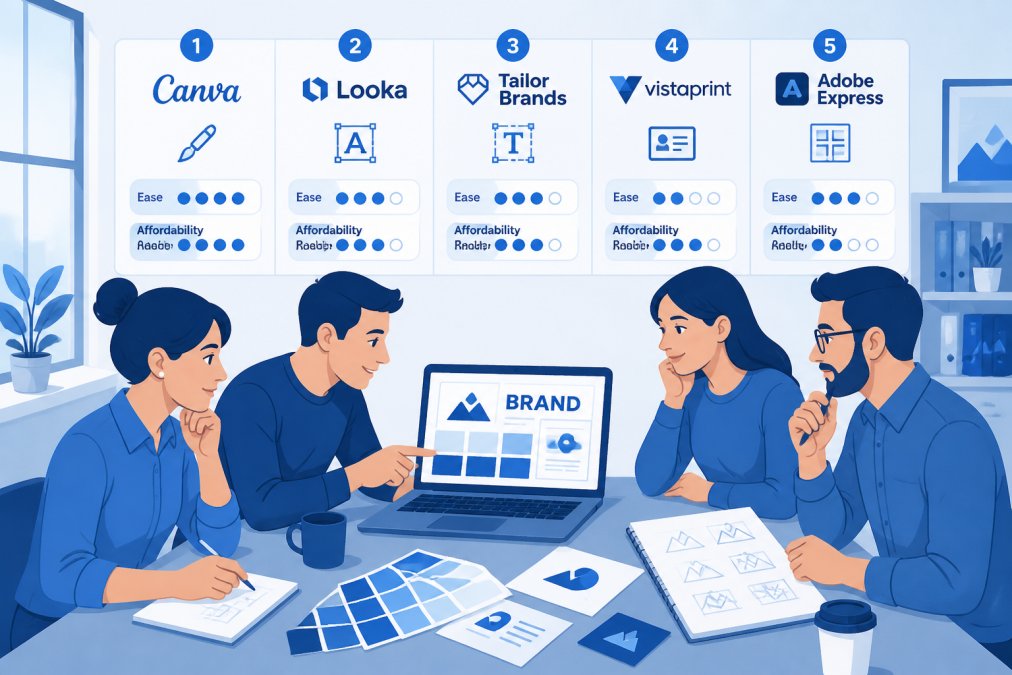
The free tier includes one file with limited features. For teams, the Professional plan (approximately US$16 per user per month when billed annually) is worth it.
Figma’s free tier limits you to one file. If you’re building a design system, you’ll quickly hit that ceiling. Budget for the paid plan if you’re serious about collaborative design.
Pros:
- Exceptional for collaborative design workflows
- Dev Mode simplifies handoff to developers
- Component libraries and design systems scale beautifully
- Cloud-based, accessible from anywhere
- Prototyping capabilities let you test interactions before development
Cons:
- Steep learning curve compared to Canva
- Primarily digital-focused; not ideal for print
- Free tier severely limited for teams
- Pricing is per user, which adds up with larger teams
4. Looka: AI-Powered Logo and Brand Kit Generation
Looka is the speed option. If you need a professional logo and matching brand kit in under an hour, Looka’s AI engine generates dozens of options based on your industry, style preferences, and brand description. The AI generates logos, colour palettes, typography suggestions, social media templates, and business card designs as a cohesive brand kit. The one-time purchase (US$20 for the basic package) gets you high-resolution files and full ownership rights.
This tool is ideal for bootstrapped founders who need to move fast and don’t have budget for a designer. The designs won’t be unique, thousands of startups use Looka, but they’re professional and functional. If you later hire a designer, you have a starting point instead of a blank canvas.
The limitation: the cheapest package delivers only a low-resolution PNG. For professional use, you’ll want higher-resolution files and vector formats (EPS, SVG), which pushes the cost up but remains affordable compared to hiring a designer.
Pros:
- Incredibly fast, logo and brand kit in minutes
- Affordable one-time purchase or subscription option
- AI generates multiple directions to choose from
- Full ownership rights to designs
- Includes matching social media templates and business card designs
Cons:
- Designs lack uniqueness, many startups end up with similar aesthetics
- Lowest-cost package delivers only low-resolution PNG files
- AI-generated designs may need refinement for highly specific brand visions
- Subscription auto-renewal can be a gotcha if not managed
Brand Identity Design Best Practices for Startup Growth
A strong brand identity goes beyond logo design. It’s the visual, verbal, and experiential system that makes your startup recognisable and memorable.
Start with positioning, not aesthetics. Before choosing colours or fonts, define what your startup stands for. Who are you serving? What problem do you solve? Who are your direct competitors? What makes you different? What’s your brand promise? Your visual identity should reflect this positioning. A luxury product brand and a budget-friendly brand solve the same problem but look completely different.
Build a design system early. As your startup grows, you’ll create hundreds of assets, website pages, app screens, social media posts, email templates, presentations. If each uses slightly different fonts, colours, or spacing, your brand looks fragmented. Define your core elements: primary and secondary colours, typography, spacing rules, and component patterns. Figma and Canva’s Brand Kit features lock these in place.
Consistency compounds. Every touchpoint reinforces your brand. Your website, app, email, social media, and customer support all communicate visually. When these are consistent, customers recognise you instantly. When inconsistent, customers doubt your professionalism.
Document your brand guidelines in a single, shared document. Include your logo (with clear space and minimum size), colour codes (HEX and RGB), typography rules, imagery style, and tone of voice. Share this with anyone creating brand assets.
Scalability matters. Your brand system should work for one person today and a team of ten tomorrow. Tools that support collaboration (Figma, Web Maniacs’s custom solutions) scale better than single-user tools.
Cost of Branding for Small Businesses: Budget Planning
Branding costs vary dramatically based on scope and approach.
DIY approach (Canva, Looka): NZ$20-50/month gets you access to tools for creating marketing collateral. Time investment is significant, but this works for solopreneurs and early-stage founders with limited budgets.
Hybrid approach (Figma + Canva): NZ$30-60/month for tool subscriptions, plus occasional freelancer support for complex work. You handle routine marketing assets in Canva, hire a designer for your core brand system in Figma, then maintain consistency yourself.
Full-service approach (Web Maniacs or agencies): Pricing depends on project scope and complexity. Custom branding strategy, logo design, design system development, and website implementation represent a larger investment upfront. The payoff: professional-grade work, strategic guidance, and a scalable system designed for growth. See the Web Maniacs pricing page for current rates and custom quotes.
Many startups assume branding is expensive. It doesn’t have to be. The real cost is the opportunity cost of poor branding. A founder spending 20 hours per month designing in Canva instead of selling is paying a hidden cost. A startup with inconsistent brand assets looks unprofessional and loses customer trust.
Branding costs range from NZ$20/month (DIY tools) to custom quotes (full-service agencies). The best choice depends on your timeline, design complexity, and team capacity.
Startup Branding Strategy Template: Building Your Approach
A clear branding strategy prevents wasted effort and ensures your tools serve a purpose.
1. Brand Positioning (Foundation)
- Who is your target customer? (Be specific)
- What problem do you solve?
- Who are your direct competitors?
- What makes you different?
- What’s your brand promise?
2. Brand Identity (Visual System)
- Logo style: Modern, minimal, playful, corporate, custom illustration?
- Colour palette: Primary colour, secondary colours, neutrals (define HEX codes)
- Typography: Headline font, body font, when to use each
- Imagery style: Photography style, illustration approach, or both?
- Brand voice: Tone of communication (formal, conversational, humorous, authoritative?)
3. Brand Assets (What You’ll Create)
- Website pages and layout
- Social media templates
- Email templates and signatures
- Presentation decks
- Business cards, letterheads, and print materials
- App or product interface design
- Customer communication templates
4. Brand Guidelines (Documentation)
- Logo usage rules and clear space requirements
- Colour codes and approved usage
- Font pairings and sizing
- Photography and imagery guidelines
- Tone of voice examples
- What NOT to do
5. Implementation Timeline
- Month 1: Define positioning and core visual identity
- Month 2: Build website and primary marketing assets
- Month 3: Create social media templates and email templates
- Month 4+: Maintain consistency and evolve based on feedback
6. Measurement
- How will you know if your branding is working? (Brand awareness surveys, customer feedback, conversion rate improvements, social media engagement)
- What metrics matter most to your business?
Most startups skip this planning step and jump straight to tool selection. That’s backwards. Your strategy determines which tools you need. A founder building a SaaS product needs Figma for UI/UX design. A local service business needs Canva for social media and Google Local Optimisation support from Web Maniacs. An e-commerce store needs brand consistency across product photography, website, and email marketing.
Choosing the right branding tools for startups depends on your timeline, budget, and design complexity. For most early-stage founders, Canva delivers immediate results at low cost. For teams building digital products, Figma is essential. For startups ready to invest in professional branding strategy that connects to your entire digital presence and customer acquisition funnel, Web Maniacs combines custom branding, website design, and results-driven digital marketing into a cohesive approach. Get started with Web Maniacs and build a brand identity that converts customers into advocates.
Frequently Asked Questions
What are the essential branding tools for a new business?
New businesses need tools across three areas: logo and visual design (Canva or Looka), collaborative design for digital products (Figma), and brand consistency management. Start with one tool that matches your immediate needs, design creation or asset management, then expand as your team grows. Most startups begin with Canva or Looka because they're affordable and require no design experience. As you scale, add collaboration tools like Figma and digital asset management platforms to maintain brand consistency across all touchpoints.
How can AI tools assist with startup branding in 2026?
AI-powered branding tools like Looka generate logos, colour palettes, and complete brand kits in minutes, eliminating months of designer iterations. AI features in Canva and Adobe Creative Cloud automate background removal, image enhancement, and content suggestions. These tools reduce the time from concept to launch and lower initial branding costs significantly. However, AI-generated designs work best as starting points, human refinement ensures your brand reflects your unique positioning and stands out in your market.
How much should a startup budget for branding tools?
Budget depends on your approach. DIY solutions like Canva (NZ$20/month) or Looka (US$20 one-time) cost under NZ$50 to start. Mid-range stacks including Figma and Mailchimp run NZ$150-300/month. Professional suites like Adobe Creative Cloud (NZ$19.32/month per app) plus Semrush (US$139.95/month) reach NZ$400+/month. Most early-stage startups allocate NZ$100-200/month initially, scaling up as revenue grows. The key is matching tool complexity to your team's skill level, simpler tools save money but may limit design possibilities.
Do I need a professional designer if I use branding software?
No, not initially. Tools like Canva and Looka let non-designers create professional-looking assets immediately. However, as your brand matures, professional designers add strategic value, they ensure your visual identity aligns with your market positioning and evolves with your business. Many startups use software tools for rapid iteration and testing, then hire designers to refine the final direction. This hybrid approach balances speed, cost, and quality during early growth stages.
This article was written using GrandRanker