
SaaS Integration Explained for Beginners: NZ Guide
Table of Contents
- What is SaaS Integration?
- How SaaS Integration Works
- Benefits of SaaS Integration for NZ SMEs
- Common SaaS Integration Challenges
- Data Security and Privacy Act 2020 Compliance
- SaaS Integration Tools for Small Business
- DIY vs. Managed Service Provider: Making the Right Choice
- Getting Started with SaaS Integration
Last Updated: August 8, 2026
What is SaaS Integration?
SaaS integration is the process of connecting cloud-based software applications so they can exchange data and automate workflows without manual intervention. Rather than entering the same information into multiple systems, integration allows applications to "talk" to each other automatically, syncing customer records, orders, payments, and other business data in real time.
Think of it this way: your e-commerce platform holds customer purchase history, your accounting software tracks invoices, and your email marketing tool manages campaigns. Without integration, you’re manually copying data between systems. With integration, a new customer order automatically updates your inventory, triggers an invoice, and adds the customer to a welcome email sequence, all instantly.
For New Zealand small and medium-sized enterprises (SMEs), SaaS integration explained in practical terms means fewer manual data entry errors, faster business processes, and better decision-making because your teams work with current information. According to research on cloud adoption in ANZ markets, businesses that integrate their software stack see measurable improvements in operational efficiency within the first month.
Web Maniacs helps businesses implement these integrations as part of custom software development and digital transformation projects. The complexity of SaaS integration can range from simple, connecting two applications via a pre-built connector, to sophisticated, requiring custom middleware and API development for legacy systems.
How SaaS Integration Works
SaaS integration works through three primary mechanisms: direct API connections, integration platforms as a service (iPaaS), and webhooks. Each approach has different technical requirements, costs, and maintenance overhead.
API Connections
An API (Application Programming Interface) is a standardized way for two applications to communicate. When you integrate via API, one application sends a request to another asking for data or instructing it to perform an action. The second application responds with the requested information or confirms the action was completed.
Here’s a practical example: your WooCommerce store uses an API to tell your accounting software about a new sale. WooCommerce sends the order details, customer name, items purchased, total amount, to your accounting platform’s API endpoint. The accounting software receives this data, creates an invoice automatically, and returns a confirmation. This happens in seconds with zero human involvement.
API integrations require technical setup. Someone needs to configure authentication (usually OAuth, a secure protocol that grants permission without sharing passwords), map the data fields between systems, and handle error scenarios when something goes wrong.
The advantage of API integration is precision and real-time data flow. The disadvantage is that it demands technical expertise to set up and maintain. If the API changes, your integration may break. For SMEs without in-house developers, this is where Web Maniacs’s custom software development services become valuable, your team doesn’t need to maintain the technical complexity.
iPaaS Platforms and Connectors
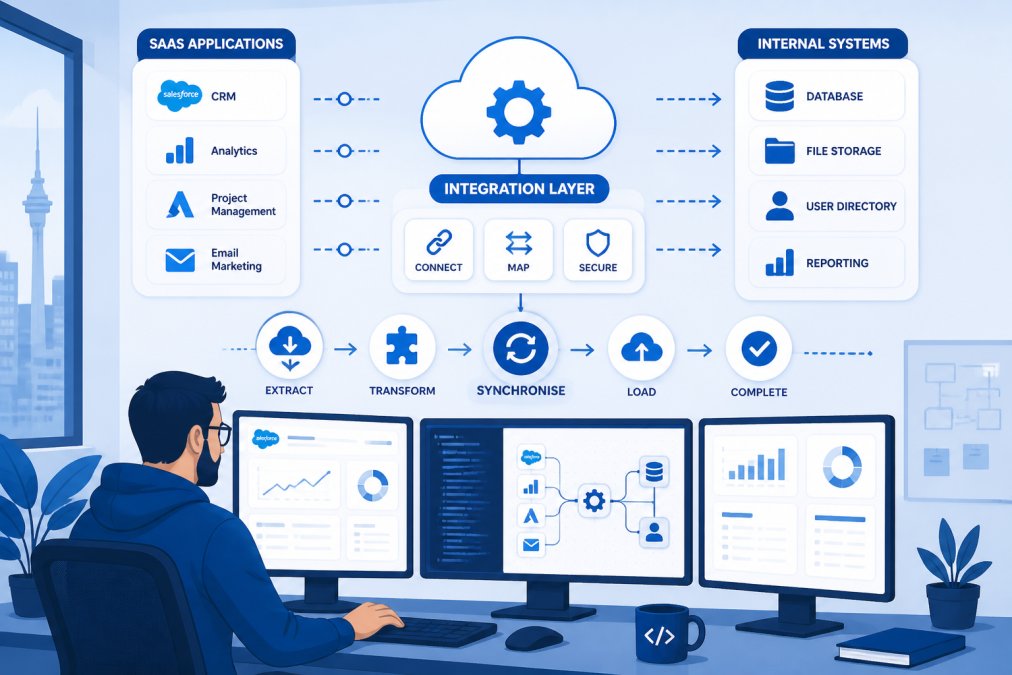
Most modern SaaS platforms provide REST APIs using JSON format for data exchange, which is the industry standard. iPaaS (Integration Platform as a Service) removes the need for custom coding. Platforms like Zapier, Make, and others provide pre-built connectors, plug-and-play bridges between popular SaaS applications. You select your source application, choose your destination, map the fields you want to sync, and the platform handles the technical work.
iPaaS is ideal for teams without developer resources. Setup takes hours instead of weeks. Most connectors are maintained by the iPaaS provider, so when an API changes, the provider updates the connector and your integration keeps working.
The trade-off is flexibility. iPaaS connectors work well for standard use cases but struggle with complex, custom business logic. If your integration needs to transform data in specific ways or handle edge cases unique to your business, a pre-built connector may not be sufficient.
Webhooks and Real-Time Data Exchange
Webhooks are event-triggered messages. Instead of one application constantly asking another "Do you have new data?" webhooks allow an application to push data the moment something happens. When a customer completes a purchase in your e-commerce platform, a webhook instantly notifies your CRM, your email platform, and your analytics tool.
Webhooks enable true real-time data exchange without polling (repeatedly asking for updates), which reduces latency and server load. However, they require the receiving application to have an endpoint ready to accept incoming data, which again demands technical setup.
Benefits of SaaS Integration for NZ SMEs
The business case for SaaS integration is straightforward: it saves time, reduces errors, and improves data accuracy. For small businesses operating with lean teams, these benefits compound quickly.
Operational efficiency is the immediate gain. Manual data entry is eliminated. A team member no longer spends two hours every morning copying yesterday’s orders from the e-commerce platform into the accounting system. That task now happens automatically overnight. Over a year, that’s hundreds of hours reclaimed.
Data accuracy improves when integration removes manual transcription. Typos, missing fields, and duplicate records, common in manual workflows, disappear. Your financial reports are based on accurate, current data rather than yesterday’s snapshot.
Faster decision-making follows from accurate, real-time data. Your dashboard shows current inventory levels, not estimated ones. Your sales manager sees this month’s revenue immediately, not after the accounting team reconciles everything at month-end.
Scalability becomes possible without proportional cost increases. When you double your order volume, your integrated system scales automatically. Your team doesn’t need to hire additional staff just to handle data entry for the increased volume.
For New Zealand SMEs specifically, integration supports compliance with data protection obligations. The Privacy Act 2020 requires organisations to keep personal information secure and accurate. Integration reduces the number of manual touchpoints where data could be mishandled or lost in transition between systems.
Common SaaS Integration Challenges
Most integration projects encounter predictable obstacles. Understanding these upfront helps you plan better and avoid costly mistakes.
Data mapping complexity emerges when two systems use different field names or structures for the same concept. Your e-commerce platform calls a field "customer_phone" while your CRM calls it "contact_number." Someone needs to define which fields map to which, handle cases where data is missing in one system, and decide what happens when conflicting information exists.
Legacy system compatibility is a real constraint for established businesses. Older software may have limited or poorly documented APIs. Integrating a 10-year-old accounting system with modern cloud applications often requires middleware, additional software that sits between the two systems translating requests and responses.
Authentication and security add complexity. Each system requires secure credentials or tokens. Managing these securely, rotating them regularly, and ensuring only authorised applications can access data demands careful planning. Mistakes here create security vulnerabilities.
Latency and synchronisation timing matter more than many businesses expect. Real-time integration sounds ideal but isn’t always necessary or cost-effective. Syncing customer records every 15 minutes may be sufficient for your use case, eliminating the expense of true real-time architecture.
Maintenance and technical debt accumulate over time. Integrations break when APIs change, when data volumes exceed expected thresholds, or when business logic shifts. Someone needs to monitor these systems, update them when needed, and troubleshoot failures. This ongoing cost is often underestimated during planning.
Data Security and Privacy Act 2020 Compliance
New Zealand’s Privacy Act 2020 establishes rules for how organisations handle personal information. SaaS integration directly impacts compliance because data moves between systems, creating additional points where it could be mishandled.
The Act requires organisations to collect personal information only for lawful purposes, keep it secure, ensure it’s accurate, and allow individuals to access their own information. When you integrate systems, you’re moving personal data across multiple platforms. Each integration point must maintain these standards.
Key compliance considerations:
Ensure your integration only transfers data that’s necessary. If your email marketing platform doesn’t need customer phone numbers, don’t sync them. This minimises the scope of personal data in transit.
Verify that any third-party iPaaS platform or integration service you use complies with the Privacy Act and has appropriate data processing agreements in place. Many platforms are US-based, which creates additional complexity around data residency and cross-border data transfer rules.
Document your data flows. Know where customer information goes, how long it’s retained in each system, and what happens when someone requests deletion. This documentation is essential if Privacy Commission questions arise.
Implement encryption for data in transit. APIs should use HTTPS (secure HTTP), not unencrypted connections. This prevents data interception during transfer between systems.
SaaS Integration Tools for Small Business
For SMEs without developer resources, several categories of tools exist. The right choice depends on your technical capability, budget, and integration complexity.
iPaaS platforms like Zapier and Make offer the fastest time to value. They provide hundreds of pre-built connectors between popular applications. Setup is visual, no coding required. Costs scale with the number of "tasks" (automated workflows) you create. For simple integrations, these platforms are cost-effective. For complex, custom logic, they become expensive or insufficient.
Middleware solutions sit between systems, translating data and requests. They’re more powerful than iPaaS for complex scenarios but require more technical expertise to configure. Web Maniacs uses middleware approaches for clients needing sophisticated integration beyond standard connectors.
API management platforms help organisations expose their own APIs securely and manage third-party API access. These are more relevant for businesses that have built custom software and want to integrate it with other systems.
Custom development is the most flexible approach. A developer builds integration code specific to your systems and business logic. This is more expensive upfront but often more cost-effective long-term for complex scenarios because it’s tailored precisely to your needs without the compromises of pre-built tools.
DIY vs. Managed Service Provider: Making the Right Choice
The decision between building integrations yourself and hiring a managed service provider hinges on three factors: technical capability, time availability, and integration complexity.
DIY integration makes sense when:
You have in-house developers with API experience and bandwidth. Your integrations are straightforward, connecting two modern SaaS platforms with good API documentation. You have time to maintain the integrations as APIs change and your business logic evolves. You’re comfortable troubleshooting integration failures at 2 AM if a critical data sync breaks.
Managed service provider (MSP) approach is better when:
You lack in-house technical expertise. Your integrations involve legacy systems or complex custom logic. You need someone accountable if integrations fail, an MSP carries that responsibility. You want to focus your team on core business activities rather than integration maintenance. Your integration needs will grow over time and you want a partner who can scale with you.

Web Maniacs positions itself as an MSP for custom integration work. Rather than offering pre-built connectors, we develop tailored solutions for your specific systems, handle ongoing maintenance, and take responsibility for keeping integrations working as your business evolves. For SMEs, this eliminates the need to hire and retain specialist developers.
The cost comparison isn’t straightforward. A simple Zapier integration might cost tens to hundreds of dollars per month. A custom integration built by an MSP might cost several thousand dollars upfront plus ongoing maintenance. However, custom solutions often prove more cost-effective for complex scenarios where pre-built tools are insufficient or would require workarounds that create technical debt.
Getting Started with SaaS Integration
Start by mapping your current data flows. Document which systems hold what information and where data currently moves manually. This audit reveals which integrations would create the most value.
Prioritise integrations by impact. An integration that eliminates 10 hours of manual work weekly should come before one saving 2 hours monthly. Calculate the annual time savings and compare it to the integration cost, this justifies the investment to stakeholders.
Evaluate your technical capability honestly. Can your team build and maintain integrations, or do you need external help? If you have developers, evaluate whether custom development or iPaaS is appropriate. If you don’t, an MSP removes this decision, they handle the technical work.
Choose a starting point, typically an integration between your primary business system (e-commerce, CRM, or accounting) and your second most important system. Success with a first integration builds confidence and demonstrates value to your organisation.
Document the integration as you build it. Record which fields map to which, how errors are handled, and what monitoring alerts exist. This documentation becomes essential when troubleshooting or when someone else needs to maintain the integration later.
Test thoroughly before going live. Run the integration with test data, verify that information syncs correctly, and confirm that edge cases (missing fields, unusual data formats) are handled properly. Test what happens when one system is temporarily unavailable, does the integration queue data and retry, or does it fail?
Monitor actively after launch. Set up alerts for integration failures. Review logs regularly to catch issues before they impact your business. Most integration problems appear as patterns, a specific data type consistently fails, or failures spike at certain times, and early detection prevents widespread data issues.
SaaS integration transforms how your team works with data. Rather than managing information across disconnected systems, integration creates a unified digital environment where data flows automatically where it’s needed. For New Zealand SMEs, the choice between building integrations yourself and working with a managed service provider depends on your technical resources and integration complexity. Web Maniacs helps businesses implement integrations as part of custom software development, taking the technical complexity off your hands so your team can focus on growing the business. Get started with a clear map of your current data flows, prioritise integrations by impact, and choose the approach, DIY, iPaaS, or custom development, that matches your capability and budget.
Frequently Asked Questions
What is SaaS integration in simple terms?
SaaS integration connects your cloud-based applications so they share data automatically. Instead of manually copying information between tools, integration lets your apps talk to each other. For example, a customer record entered in your CRM can automatically appear in your accounting software. This saves time and reduces errors. Most integrations use APIs (application programming interfaces) or platforms called iPaaS to make this connection work smoothly.
Why do NZ businesses need SaaS integration?
NZ SMEs juggle multiple cloud tools: accounting software, customer databases, email marketing platforms, and project management systems. Without integration, your team wastes hours copying data between systems and risks inconsistencies. SaaS integration eliminates data silos, improves operational efficiency, and gives you real-time visibility across your business. For compliance with New Zealand's Privacy Act 2020, integration also helps maintain accurate customer records and audit trails, reducing legal risk.
Do I need a developer to handle SaaS integration?
It depends on complexity. Simple integrations using plug-and-play connectors or iPaaS platforms like Zapier require no coding, most small businesses can set these up themselves. However, custom integrations with legacy systems, complex data mapping, or specific workflow automation often benefit from professional help. A managed service provider or custom development team can design integrations that fit your exact business needs and ensure proper security and compliance with NZ data protection standards.
What are the common benefits of integrating SaaS applications?
SaaS integration delivers faster workflows (no manual data entry), better accuracy (single source of truth), improved decision-making (real-time data), and cost savings (fewer duplicate tools). For NZ SMEs specifically, integration reduces the technical burden on small teams, improves customer experience through consistent data, and strengthens compliance with Privacy Act 2020 requirements. Automated processes also free your team to focus on strategy rather than administrative tasks.
This article was written using GrandRanker