
SaaS Integration for eCommerce: NZ Timeline & Complexity Guide
Table of Contents
- How Long Does SaaS Integration Take for eCommerce in NZ?
- Integration Complexity Tiers: What Determines Your Timeline
- eCommerce Platform Integration Timeframes in NZ
- SaaS Integration Challenges for eCommerce in NZ
- Types of SaaS Integration for eCommerce in NZ
- iPaaS Solutions for New Zealand eCommerce Businesses
- Post-Integration Maintenance Overhead: What Comes After Launch
- Reducing Integration Time: Practical Steps for Your Team
SaaS Integration for eCommerce: NZ Timeline & Complexity Guide
Last Updated: August 2, 2026
How Long Does SaaS Integration Take for eCommerce in NZ?
SaaS integration timelines range from one week for simple plug-and-play solutions to three months for complex custom builds involving multiple data sources and middleware. Your timeline depends on platform complexity, the number of third-party systems requiring synchronisation, your team’s technical capacity, and whether you’re building on existing infrastructure or starting fresh.
Most businesses underestimate integration time by 30-40% because they focus only on initial API connectivity, forgetting testing, data mapping, security patching, and edge cases. Build a buffer into your timeline.
What Affects Your Integration Timeline
Technical architecture complexity is the primary driver. A simple REST API integration takes days; systems requiring webhook configuration, real-time synchronisation, and custom middleware take weeks or months.
Your existing infrastructure matters enormously. Custom-built eCommerce systems with undocumented APIs require significantly longer integration than platforms like Shopify with established connector ecosystems.
Team capability and developer resources determine execution speed. Teams with prior experience integrating your specific SaaS platform move faster than those learning the platform for the first time.
Scope creep and requirement changes during integration are inevitable. Defining your integration scope clearly upfront prevents timeline slippage.
The single biggest timeline killer isn’t technical difficulty, it’s unclear requirements. Spend two weeks documenting exactly what data needs to flow where, in what format, and how often. This saves four weeks later.
Why Speed Matters to Your Business
Integration speed directly impacts time-to-market and revenue. Every week your system isn’t live is a week you’re missing transactions or operational efficiency gains. A mid-sized online retailer processing £50,000 in weekly transactions loses £7,000 per day the integration isn’t live.
Platform agility becomes a competitive advantage once integrations are stable. Businesses that quickly add new sales channels, payment methods, or fulfillment partners respond faster to market opportunities.
Integration Complexity Tiers: What Determines Your Timeline
We group eCommerce SaaS integrations into three tiers based on technical requirements, data complexity, and resource allocation.
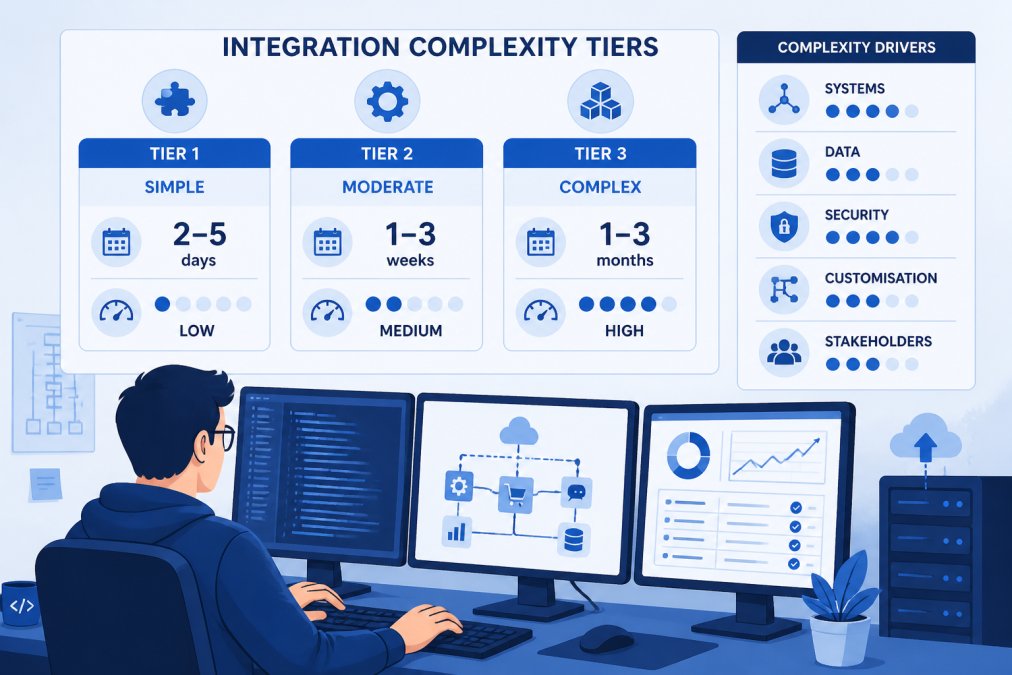
Tier 1: Simple Plug-and-Play Integrations (1-5 days)
Tier 1 integrations use pre-built connectors or native integrations requiring minimal configuration. These are typically one-directional data flows with simple data mapping.
Examples: Connecting Shopify to Google Analytics, adding Stripe to WooCommerce via a standard plugin, integrating Mailchimp with your store’s subscriber list.
Setup involves authenticating accounts, selecting data fields to sync, configuring workflow rules, and testing with sample transactions. A single developer handles this in 1-3 days. No middleware or custom code required beyond configuration.
Small eCommerce stores (under £100K annual revenue) running Shopify or WooCommerce who need to connect standard tools without custom development.
Tier 2: Standard API Connectivity (2-4 weeks)
Tier 2 integrations require custom API development but follow established patterns. You’re building bidirectional data synchronisation, handling authentication, and managing data transformation between systems.
Examples: Syncing real-time inventory between WooCommerce and a warehouse management system, connecting a custom eCommerce platform to multiple payment processors, integrating a CRM system requiring customer data flowing both directions.
Development work includes API authentication, data mapping, webhook setup, error handling, and testing across multiple scenarios. A team of 1-2 developers typically completes this in 2-4 weeks depending on data complexity and API documentation quality.
Tier 3: Complex Custom Builds with Middleware (6-12 weeks)
Tier 3 integrations involve multiple systems, complex business logic, and often require middleware or iPaaS solutions to orchestrate data flows.
Examples: Building a unified commerce platform synchronising inventory, orders, and customer data across your eCommerce store, physical retail locations, and third-party marketplaces. Integrating a custom ERP system with your eCommerce platform and multiple fulfillment partners.
Work includes middleware selection, complex workflow automation, data reconciliation logic, security patching, and extensive testing. A team of 3-5 developers working full-time typically needs 6-12 weeks.
Tier 3 integrations accumulate technical debt quickly if not built with scalability in mind. A poorly architected Tier 3 integration can cost 3-4x more to maintain than to build initially. Invest in proper documentation and code standards from day one.
| Tier | Timeline | Developer Resources | Cost Structure | Best For |
|---|---|---|---|---|
| Tier 1 | 1-5 days | 1 developer | SaaS subscription only | Small stores, standard tools |
| Tier 2 | 2-4 weeks | 1-2 developers | Subscription + integration services | Growing stores, custom workflows |
| Tier 3 | 6-12 weeks | 3-5 developers | Subscription + significant development + ongoing support | Enterprise, multi-system orchestration |
eCommerce Platform Integration Timeframes in NZ
Different eCommerce platforms have different integration ecosystems, affecting integration timelines.
WooCommerce Integrations
WooCommerce integrations typically fall into Tier 1 or Tier 2 because WooCommerce uses standard WordPress and REST API patterns.
Native plugin ecosystem: WooCommerce has thousands of pre-built plugins for common integrations. If your SaaS tool has a WooCommerce plugin, setup takes 1-3 days.
Custom API development: WooCommerce’s REST API is well-documented and mature. Building custom integrations typically takes 2-4 weeks for straightforward use cases.
Real-world timeline: Adding a new payment processor takes 2-3 days. Adding a custom inventory sync system takes 3-4 weeks.
Shopify Plus and Enterprise Platforms
Shopify Plus integrations range from Tier 1 (pre-built apps) to Tier 2 (custom API development) to Tier 3 (complex multi-system orchestration).
Shopify App Store: Installation and configuration takes 1-2 days, but you’re limited to what the app offers.
Custom Shopify API development: Shopify’s GraphQL and REST APIs are mature and well-documented. Building custom integrations typically takes 3-6 weeks.
Shopify Flow for workflow automation: Shopify’s native workflow automation tool lets non-developers build integrations without code. Simple workflows take days; complex ones require custom development and take weeks.
Real-world timeline: Connecting to a standard SaaS tool via the App Store takes 2-3 days. Building a custom integration to a legacy system takes 4-8 weeks.
Custom-Built eCommerce Systems
Custom eCommerce platforms require fully custom integration development, almost always falling into Tier 2 or Tier 3.
No pre-built connectors: Your development team must build all integration logic from scratch.
API design matters: Well-designed, documented APIs enable faster integration. Poorly designed or undocumented APIs significantly extend timelines.
Real-world timeline: Integrating a standard SaaS tool into a well-built custom platform takes 3-6 weeks. Integrating into a legacy system with poor API design takes 8-16 weeks.
If you’re building a custom eCommerce system, design your API for integration from day one. A clean, well-documented API reduces future integration costs by 40-60%.
SaaS Integration Challenges for eCommerce in NZ
Understanding common integration challenges helps you anticipate problems and build realistic timelines.
Data Synchronisation and Latency Issues
Real-time data synchronisation encounters edge cases. What happens when two systems update the same record simultaneously? How do you handle partial failures where one system succeeds and another fails?
Synchronisation latency introduces delays between when data updates in one system and when it appears in another. A five-minute delay in inventory updates might be acceptable; a five-hour delay causes overselling and customer frustration.
Conflict resolution becomes critical with bidirectional sync. If your inventory system says you have 10 units and your eCommerce store says 12, which is correct? You need explicit conflict-resolution logic.
Most teams discover these challenges during testing, which adds 1-2 weeks to Tier 2 integrations and 2-4 weeks to Tier 3 integrations.
NZ-Specific Compliance and Security Standards
New Zealand businesses must comply with several regulations affecting SaaS integration design.
Privacy Act 2020 requires explicit consent before processing personal data and mandates security standards for data storage. If your integration involves customer data, you need explicit data processing agreements with SaaS providers.
NZX Financial Market Conduct Regulations apply if you’re processing payments or financial data. Your integration must maintain audit trails and implement transaction verification.
Data residency requirements: Some NZ organisations require data to remain within New Zealand, affecting which SaaS providers you can use and how you architect integrations.
Building compliance into your integration from the start costs more upfront but prevents expensive rewrites later. Budget an extra 1-2 weeks for Tier 2 integrations and 2-4 weeks for Tier 3 integrations to address compliance requirements.
Treating compliance as an afterthought is expensive. A security audit discovering compliance gaps three months after launch often costs 2-3x more to fix than building compliance in from the start. Engage your legal and security teams before development begins.
Types of SaaS Integration for eCommerce in NZ
Different integration approaches have different time-to-market, cost, and scalability characteristics.
Native Integrations and Pre-Built Connectors
Native integrations are built directly into your eCommerce platform. Pre-built connectors are third-party integrations connecting two specific systems without custom code.
Timeline: 1-3 days for setup and configuration.
Pros: Fast deployment, low cost, minimal technical expertise required.
Cons: Limited flexibility. You can only use the features the integration provides.
Best for: Small eCommerce stores with standard integration needs.
SaaS vs PaaS vs Custom Development
SaaS: You use pre-built integrations provided by your SaaS vendor.
PaaS: You use a platform (like Zapier, Make, or Workato) to build integrations without writing code.
Custom development: Your team writes custom code to build integrations.
Timeline comparison:
- SaaS: 1-3 days
- PaaS: 1-2 weeks
- Custom: 2-12 weeks depending on complexity
Cost comparison:
- SaaS: Lowest upfront, highest long-term (limited by what’s possible)
- PaaS: Medium upfront and ongoing
- Custom: Highest upfront, lowest long-term (most flexibility)
Best for:
- SaaS: Standard use cases, small teams
- PaaS: Non-technical teams needing flexibility beyond pre-built connectors
- Custom: Complex requirements, significant volume, long-term cost optimization
Hosted Solutions and Third-Party Middleware
Hosted solutions are SaaS platforms handling integration for you. Third-party middleware (iPaaS) acts as a translator between your systems.
Timeline: Hosted solutions take 1-5 days. Middleware setup takes 2-6 weeks depending on complexity.
Pros: Hosted solutions require minimal technical expertise. Middleware provides maximum flexibility.
Cons: Hosted solutions limit customization. Middleware requires technical expertise to configure.
Best for: Hosted solutions work for standard integrations. Middleware works when you need flexibility and have technical capacity.
iPaaS Solutions for New Zealand eCommerce Businesses
iPaaS (Integration Platform as a Service) solutions like Zapier, Make, Workato, and Tray.io provide pre-built connectors and visual workflow builders that reduce integration time and technical complexity.
How iPaaS Reduces Time-to-Market
iPaaS platforms handle authentication, data transformation, and error handling automatically. You build integrations by connecting pre-built blocks rather than writing code.
Timeline advantage: An integration taking 4 weeks with custom development might take 1-2 weeks with iPaaS.
Cost advantage: You avoid hiring specialized developers for integration work. Non-technical team members can build simple integrations.
Scalability trade-off: iPaaS platforms charge per task or per workflow execution. High-volume integrations become expensive. A system processing 1 million transactions monthly might cost £500-2,000 monthly on iPaaS versus a one-time £10,000 development cost for custom integration.
Best for: Growing eCommerce businesses needing multiple integrations without the budget for a dedicated integration team.
Real-Time Data Mapping and Workflow Automation
iPaaS platforms excel at real-time data mapping and workflow automation.
Data mapping: iPaaS platforms automatically transform data between systems. If your inventory system uses different field names than your eCommerce store, iPaaS handles the translation.
Workflow automation: You define business rules visually. "When a new order comes in, create a customer record in our CRM, send a confirmation email, and update inventory" becomes a visual workflow instead of code.
Real-time processing: iPaaS platforms can process data in real-time or on a schedule. You choose the frequency matching your business needs.
Monitoring and alerting: iPaaS platforms provide dashboards showing integration health, error rates, and latency. You get alerts when integrations fail.
Most NZ eCommerce businesses find iPaaS valuable for their first 2-5 integrations, then migrate to custom development once integration needs become complex enough to justify dedicated engineering resources.
Growing eCommerce stores (£100K-£1M revenue) needing multiple integrations without the budget for a dedicated integration team. Ideal for non-technical founders who want to move fast.
Post-Integration Maintenance Overhead: What Comes After Launch
Integration doesn’t end at launch. Ongoing maintenance, monitoring, and optimization consume resources and budget.
Security Patching and Compliance Updates
Your SaaS integrations must be updated regularly to address security vulnerabilities and maintain compliance.
Security patches: SaaS providers release security updates regularly. You must apply these updates or risk data breaches.
Compliance updates: New Zealand regulations and industry standards change. Your integrations must be updated to maintain compliance.
Budget: Plan for 2-4 hours monthly per integration for security and compliance maintenance.
Monitoring Integration Latency and Transaction Performance
Integration monitoring reveals performance issues before they impact customers.
Latency monitoring: Track how long data takes to sync between systems. If latency increases, investigate the cause.
Error tracking: Monitor failed transactions and identify patterns.
Volume monitoring: Track transaction volume over time. If volume spikes, ensure your integration scales to handle it.
Alerting: Set up alerts for latency spikes, error rate increases, or authentication failures.
Budget: Plan for 4-8 hours monthly per integration for monitoring and optimization.
Cost Structures: Subscription Pricing and Hidden Fees
SaaS integration costs extend beyond initial development.
SaaS subscription fees: Most SaaS tools charge monthly subscriptions scaling with usage.
Infrastructure costs: Hosting, databases, and monitoring infrastructure add up. Budget £50-500 monthly depending on volume.
Developer time: Maintenance, troubleshooting, and optimization require ongoing developer time.
Total cost of ownership: A Tier 2 integration typically costs £10,000-30,000 to build and £2,000-5,000 annually to maintain. A Tier 3 integration might cost £50,000-150,000 to build and £5,000-15,000 annually to maintain.
| Cost Category | Tier 1 | Tier 2 | Tier 3 |
|---|---|---|---|
| Initial development | £0-2,000 | £10,000-30,000 | £50,000-150,000 |
| Annual maintenance | £500-1,000 | £2,000-5,000 | £5,000-15,000 |
| Infrastructure | £0-100/mo | £50-300/mo | £200-1,000/mo |
| SaaS subscriptions | £50-500/mo | £100-1,000/mo | £500-3,000/mo |
Reducing Integration Time: Practical Steps for Your Team
Here’s a five-step process to reduce integration time and avoid common pitfalls.
Step 1: Define Your Integration Scope and Technical Requirements
Before any development starts, document exactly what needs to integrate and how.
Data requirements: List every data field that needs to flow between systems. Include data type, frequency, and direction.
System requirements: Document your existing systems, their APIs, and any constraints.
Business rules: Define how conflicts are resolved, what happens when integrations fail, and what edge cases exist.
Compliance requirements: Identify which regulations apply and what compliance controls you need.
Timeline: 2-3 weeks. This upfront work saves 4-8 weeks during development.
Step 2: Choose the Right Integration Method for Your Platform
Evaluate your options: native integration, pre-built connector, iPaaS, or custom development.
Evaluation criteria:
- Does a native integration exist? Use it.
- Does a pre-built connector exist? Use it if it meets your requirements.
- Is custom development needed? Consider iPaaS first, then custom development.
Cost-benefit analysis: Compare upfront cost, ongoing costs, flexibility, and time-to-market for each option.
Vendor lock-in: Consider whether your choice creates dependency on a specific vendor. Custom development reduces vendor lock-in.
Timeline: 1-2 weeks.
Step 3: Plan Your Deployment Cycle and MVP Approach
Don’t try to build the perfect integration in one go. Use an MVP (minimum viable product) approach.
MVP phase (weeks 1-2): Build the simplest possible integration that delivers value. Sync only essential data.
Testing phase (weeks 3-4): Test thoroughly. Identify edge cases and failure modes.
Production phase (week 5+): Deploy to production. Monitor closely. Add features based on learnings.
Staging environment: Always test integrations in a staging environment that mirrors production before deploying.
Rollback plan: Document how to roll back the integration if problems emerge.
Step 4: Allocate Developer Resources and Manage Technical Debt
Integration success depends on having the right people with the right skills.
Dedicated resources: Assign developers exclusively to the integration project. Context-switching kills productivity.
Skill requirements: Identify required skills and hire or upskill accordingly.
Code quality standards: Establish standards for logging, error handling, documentation, and testing. Enforce them from day one.
Technical debt tracking: Document shortcuts taken during development. Plan to address them after launch.
Step 5: Test, Monitor, and Optimise for Platform Agility
Integration testing is comprehensive. You’re testing not just that data transfers, but that it transfers correctly under all conditions.
Functional testing: Does the integration do what it’s supposed to do?
Edge case testing: What happens when unusual scenarios occur?
Load testing: Does the integration handle your expected transaction volume?
Security testing: Can unauthorized users access the integration? Are credentials stored securely?
Monitoring setup: Deploy monitoring before going live. Track latency, error rates, and volume.
Performance optimization: Once live, monitor performance and optimize slow queries, add caching, and scale infrastructure as needed.
The teams that finish integrations fastest are those that plan thoroughly upfront, test comprehensively, and monitor obsessively. Rushing any of these three phases costs time later.
Most eCommerce businesses underestimate how long SaaS integrations take because they focus only on the happy path. The reality involves edge cases, compliance requirements, security considerations, and ongoing maintenance. At Web Maniacs, we help NZ eCommerce businesses navigate this complexity by designing integrations for scalability and maintainability from day one. We provide expert digital solutions, including custom software development, website design, and mobile app creation, tailored to help your business thrive online. If you’re planning an integration and want to avoid common pitfalls, get started with Web Maniacs and let our team guide you through the process with a realistic timeline and sustainable architecture.
Privacy Act 2020 guidance for businesses
Shopify API documentation and integration resources
WooCommerce REST API developer documentation
Frequently Asked Questions
What factors influence the timeline of SaaS integration for eCommerce in NZ?
Your timeline depends on integration complexity, API connectivity requirements, platform compatibility, and available developer resources. Simple pre-built connectors may take 1-5 days, while custom builds with middleware can take 6-12 weeks. NZ-specific compliance standards, data synchronisation needs, and third-party connector availability also affect your schedule. Scope clarity and technical requirements planning upfront significantly reduce deployment cycles.
How long does SaaS integration take for WooCommerce eCommerce stores in NZ?
WooCommerce integrations typically take 2-4 weeks for standard API connectivity, depending on the SaaS platform. Native plugins and pre-built connectors reduce this to 1-5 days. Custom configurations, data mapping, and real-time processing requirements can extend timelines. Most NZ WooCommerce stores benefit from hosted solutions or iPaaS platforms that reduce time-to-market without sacrificing platform agility or customisation capabilities.
What are the main SaaS integration challenges for eCommerce businesses in NZ?
Key challenges include data synchronisation latency, NZ-specific compliance and security standards, integration latency during peak transaction periods, and managing technical debt from legacy systems. Many businesses underestimate post-integration maintenance overhead, including security patching, subscription pricing changes, and monitoring real-time processing. Scalability constraints often emerge after launch, affecting user retention and revenue impact as transaction volumes grow.
What's the difference between iPaaS solutions and custom SaaS integration for NZ eCommerce?
iPaaS (Integration Platform as a Service) offers pre-built connectors, workflow automation, and real-time data mapping with faster time-to-market and lower upfront costs. Custom SaaS integration provides greater flexibility and control but requires more developer resources and longer deployment cycles. iPaaS solutions work well for standard integrations; custom builds suit complex workflows. NZ businesses often use iPaaS for MVP development, then migrate to custom solutions as scalability needs grow.
This article was written using GrandRanker