Local SEO for Service Area Businesses: Complete Guide
Table of Contents
- What Is Local SEO for Service Area Businesses?
- Why Local SEO Matters for Service Area Businesses
- Google Business Profile Service Area Settings Explained
- How to Rank a Service Area Business Without an Address
- Local SEO Checklist for Contractors and Service Providers
- Local SEO Strategy for Service Area Businesses: Key Tactics
- Common Mistakes Service Area Businesses Make in Local SEO
- Conclusion
Last Updated: July 4, 2026
What Is Local SEO for Service Area Businesses?
Local SEO for service area businesses focuses on optimizing your online presence to rank in Google Maps and local search results across multiple geographic areas you serve, without a fixed business address. Unlike a pizza shop with one location, service area businesses must prove relevance across multiple neighborhoods, cities, or regions simultaneously.
The core challenge is straightforward: Google’s algorithm wants to know where your business is located and where your customers are. Service area businesses break that expectation. You don’t have a single address to anchor your rankings. Instead, you need to build authority and relevance signals that convince Google you serve specific geographic areas legitimately. According to Google’s local search documentation, service area businesses must verify their legitimacy differently than storefront locations.
How SABs Differ From Storefront Businesses
Service area businesses operate under fundamentally different ranking rules than storefront locations. A dental office with a physical location has one geographic anchor point. Service area businesses don’t have that luxury. Your HVAC company might service a 50-mile radius, but Google needs proof that you actually operate in each area you claim.
This distinction shapes every decision in your local SEO strategy. A homeowner searching "emergency plumber near me" wants someone who serves their specific neighborhood. Your local SEO strategy must focus on building trust signals in each service area rather than competing on proximity alone. Citations, reviews, and location-specific content matter more than they do for storefronts.
Why Local SEO Matters for Service Area Businesses
Local search drives the highest-intent traffic available. According to BrightLocal’s local search consumer behavior report, 76% of people who search for local services on their mobile phone visit a business within 24 hours. That’s immediate purchase intent.
For service area businesses, this matters even more than retail. Your customers aren’t comparing you to five competitors in a shopping center. They’re searching "contractor near me" at 10 PM because their roof is leaking. Ranking in that moment means revenue.
Local SEO also costs far less than paid search for service area businesses. A well-optimized Google Business Profile and citation network generate qualified leads at a fraction of what you’d pay per click in Google Ads.
Focus your initial local SEO effort on 3-5 geographic areas where you have the most existing customers. Build authority there first, then expand.
Google Business Profile Service Area Settings Explained
Your Google Business Profile is the central hub for local search visibility. For service area businesses, you don’t enter a service address. Instead, you hide your business address and define service areas, the specific regions where you operate.
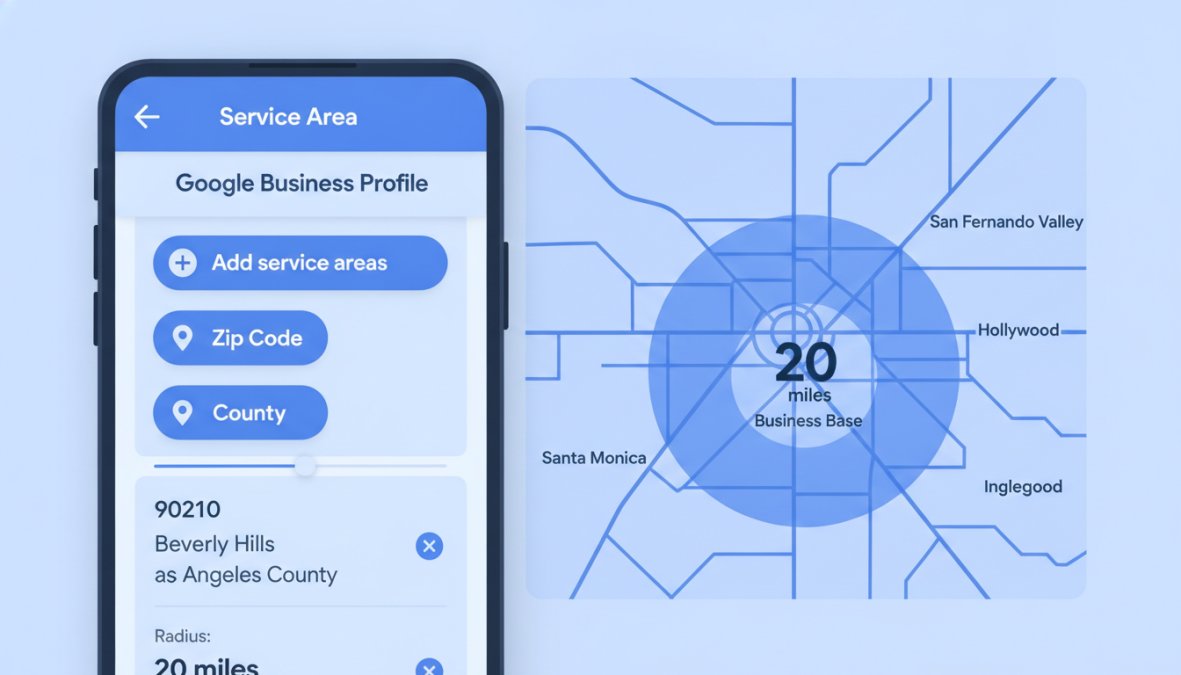
The service areas setting allows you to specify cities, postal codes, or custom radius areas where you serve customers. A plumber in Denver might define service areas including Denver, Boulder, Littleton, and Aurora. This signals to Google that you’re relevant across those geographies without claiming you have offices in each location.
Setting Up Service Areas vs. Service Radius
Service areas let you manually select specific cities or regions where you operate. This approach works best when your service territory is irregular or covers multiple non-contiguous areas.
Service radius draws a circle around a central location. You specify a center point and a radius in miles. For most service area businesses, manually defined service areas outperform radius-based approaches. They give Google clearer signals about where you actually operate.
If you set a 50-mile service radius from your office but only actually service 30 miles in one direction, you’re telling Google you serve areas where you don’t operate. This erodes trust and can hurt your rankings.
Verification Without a Physical Location
When you set up a service area business profile, you can hide your address from public view. You still need a physical address for verification purposes, typically your office or home address. Google sends a postcard to this address to confirm you operate from there. Once verified, you hide the address so customers don’t see it in search results.
Many service area businesses skip the verification step entirely because they think they can’t verify without a public address. This is a critical mistake. Unverified profiles get suppressed in search results. Verification is non-negotiable.
How to Rank a Service Area Business Without an Address
Ranking without a storefront address requires a different tactical approach. Your first priority is building citation consistency across your service areas. Citations are online mentions of your business name, address, and phone number (NAP). For service area businesses, this means listing your business in directories across each service area, even though your address is hidden.
Your second priority is location-specific content. Create landing pages for each major service area you serve. A plumber serving Denver and Boulder would create separate landing pages optimized for "plumber in Denver" and "plumber in Boulder."
Understanding Hidden Address Verification
When you create a Google Business Profile for a service area business, Google requires a real address for verification. This address doesn’t appear in search results or on your profile. It’s used only for the verification postcard process. Once verified, you mark the address as "hidden" and define your service areas instead.
The verification postcard arrives at your hidden address within 5-10 business days. You enter the verification code from the postcard into your Google Business Profile, and your profile becomes fully active.
The hidden address verification process is non-negotiable for service area businesses. Without it, your profile will remain unverified and suppressed in search results.
Building Authority Without a Storefront
Authority signals for service area businesses come from three sources: citations, reviews, and content. Citations are your primary authority builder. List your business in industry-specific directories, local business directories, and service-area-specific directories.
Reviews are your second authority builder. Encourage customers in each service area to leave reviews on your Google Business Profile. Reviews build trust with potential customers and signal to Google that you actually operate in that area.
Content is your third authority builder. Create location-specific landing pages and blog posts that target service-area keywords. A pest control company serving multiple counties would create content like "Termite treatment in Maricopa County" and "Bed bug removal in Pinal County."
Local SEO Checklist for Contractors and Service Providers
| Task | Priority | Impact | Timeline |
|---|---|---|---|
| Complete Google Business Profile with hidden address | Critical | Enables all other rankings | Day 1 |
| Verify profile with postcard | Critical | Activates profile in search | Days 1-15 |
| Define service areas in GBP | Critical | Targets correct geographies | Day 2 |
| Create location-specific landing pages | High | Builds geo-specific relevance | Weeks 1-4 |
| Build citations in 20+ directories | High | Establishes NAP consistency | Weeks 2-6 |
| Implement local schema markup | High | Helps Google understand service areas | Week 1 |
| Generate first 50 reviews | High | Builds trust and relevance signals | Ongoing |
| Optimize Google Business Profile photos and posts | Medium | Improves click-through rate | Week 2 |
| Create location-specific blog content | Medium | Targets long-tail geo keywords | Weeks 3-8 |
| Set up review monitoring system | Medium | Manages reputation across areas | Ongoing |
On-Page and Technical Optimization Steps
On-page optimization for service area businesses focuses on location-specific relevance. Your homepage targets your primary service area. Your location pages target secondary and tertiary service areas.
Each location page should include the service area name in the title tag, a clear statement of the service area in the first paragraph, local keywords throughout the content, and a call-to-action specific to that area.
Technical optimization includes implementing local schema markup on your location pages. Schema markup tells Google explicitly what your business is, where you serve, and what services you offer. For service area businesses, the LocalBusiness schema with areaServed property is essential.
Your location pages should also include your NAP (name, address, phone number) consistently. Use the same formatting everywhere, consistency matters more than perfection.
Citation Building and NAP Consistency
Citations are online mentions of your business that don’t necessarily include a link. Building citations across your service areas is one of the highest-impact local SEO activities for service businesses.
Start with major directories: Google Business Profile, Apple Maps, Bing Places, and Facebook Business. Then move to industry-specific directories relevant to your service. Next, target local business directories in each service area.
NAP consistency is critical. Your business name, address, and phone number must be identical across all citations. If your business is listed as "ABC Plumbing" on one site and "ABC Plumbing Inc." on another, Google sees these as different businesses.
Use a spreadsheet to track your citations as you build them. Record the directory name, URL, your NAP as listed, and the date you submitted. This prevents duplicate listings and helps you update information consistently.
Local SEO Strategy for Service Area Businesses: Key Tactics
Start with your existing customer base. Analyze where most of your current customers are located. These are your strongest service areas because you have real customer relationships and can generate reviews easily.
Next, identify underserved geographic areas where you want to grow. These are areas where you have capacity to take more business but currently lack visibility. Finally, identify areas you don’t serve and exclude them from your service area settings.
Geo-Targeted Keywords and Local Intent
Geo-targeted keywords combine your service type with a geographic modifier: "plumber in Denver," "emergency electrician Boulder," "roof repair near Littleton."
Identify the primary keywords for your service, then add geographic modifiers for each service area you target. Local intent keywords are your highest-priority targets. These keywords include geographic modifiers and indicate immediate need. Someone searching "emergency plumber" is ready to hire.
Create content targeting these high-intent geo-keywords. Your location pages should target keywords like "plumber in [City]" and "emergency plumber in [City]."
Location-Specific Landing Pages and Schema Markup
Location-specific landing pages are your primary tool for ranking across multiple geographies. Each page targets a specific service area and builds relevance signals for that location.
Your location pages should follow a consistent template but with unique content for each area. A template might include: service area introduction, services offered in that area, customer testimonials from that area, FAQ specific to that area, and a call-to-action.
The key is making each page genuinely unique. Include local landmarks, local challenges specific to that area, and customer stories from that location. Schema markup on location pages tells Google explicitly what you offer in each area. The LocalBusiness schema with areaServed property is essential.
Review Management and Reputation Building
Reviews are your most powerful local SEO tool for service area businesses. Each review builds trust with potential customers and signals to Google that you actually operate in that area.
Implement a systematic review generation process. After completing a job, send customers a follow-up email requesting a review. Make the process as easy as possible by including a direct link to your Google Business Profile review page.
Respond to all reviews, positive and negative. Positive reviews deserve a thank-you response. Negative reviews deserve a professional, helpful response that addresses the concern. Encourage reviews specifically from customers in each service area to build area-specific review signals.
Common Mistakes Service Area Businesses Make in Local SEO
The first mistake is not verifying their Google Business Profile. Unverified profiles get suppressed in search results. Verify your profile using your hidden address, then hide the address.
The second mistake is defining service areas too broadly. A contractor claiming to serve a 100-mile radius is less credible than one claiming to serve 10 specific cities. Define your service areas precisely based on where you actually operate.
The third mistake is inconsistent NAP data. Your business name, address, and phone number must be identical across all citations and your website. Use a spreadsheet to track your NAP and ensure consistency.
The fourth mistake is neglecting location-specific content. Create dedicated landing pages for each major service area.
The fifth mistake is not generating reviews systematically. Without a review generation process, you’ll lack critical authority signals.
The sixth mistake is ignoring local schema markup. Service area businesses especially need explicit schema markup to help Google understand their service areas and service offerings.
Conclusion
Local SEO for service area businesses requires a fundamentally different approach than storefront optimization. You’re building authority across multiple geographies without a single physical location anchor. This means your strategy must emphasize citations, location-specific content, and systematic review generation.
Businesses that implement this strategy see measurable results within 90 days. They rank for high-intent geo-keywords, attract qualified leads, and build sustainable competitive advantages in their service areas.
Service area businesses that want to dominate local search need a comprehensive strategy addressing Google Business Profile optimization, location-specific content, and citation consistency. Web Maniacs provides custom local SEO strategies that combine technical implementation with ongoing optimization. Our team handles Google Business Profile setup, location page creation, schema markup implementation, and citation building. Get started with Web Maniacs and build the local search foundation that generates qualified leads across your entire service territory.
Frequently Asked Questions
How do I set up service areas in Google Business Profile for local SEO?
In Google Business Profile, navigate to the 'Service Area' section and define the geographic regions where you operate. You can add multiple service areas by entering city names, postal codes, or drawing custom boundaries on the map. This helps local search engines understand your coverage area and improves your visibility in the local pack for searches within those regions. Ensure your service areas align with where you actually provide services to maintain credibility.
Does a service area business need a physical address for local SEO ranking?
No, service area businesses can rank without displaying a physical address. Google allows you to hide your address on Google Business Profile while still serving customers in defined service areas. However, you must provide a verified address during the verification process, it simply won't be public. This approach is ideal for contractors, plumbers, and mobile service providers who operate from home or don't maintain a customer-facing storefront.
What's the difference between local SEO for service area businesses vs. brick-and-mortar stores?
Service area businesses focus on geo-targeted keywords for multiple locations and rely heavily on service radius optimization, while brick-and-mortar stores emphasize proximity to their single address. SABs need location-specific landing pages for each service area, stronger review management across regions, and careful NAP consistency across directories. Both require Google Business Profile optimization, but SABs must manage multiple service areas and often use hidden address verification strategies.
What local SEO checklist should contractors follow to improve rankings?
Contractors should: (1) optimize Google Business Profile with complete service area coverage and high-quality photos; (2) ensure NAP consistency across all business directories and citations; (3) create location-specific landing pages for each service area; (4) implement local schema markup for service areas and business type; (5) build backlinks from local directories and industry sites; (6) actively manage and respond to customer reviews; (7) use geo-targeted keywords in on-page content; (8) track local search rankings using tools like BrightLocal or Local Falcon. This systematic approach strengthens your local search ecosystem visibility.
This article was written using GrandRanker